Describe the task
Ask the workflow to reconcile the month for a client. Give it the Xero export and the bank feed. It matches transactions, flags the discrepancies, and drafts the correcting journal entries for sign-off. Same shape applies whichever accounting stack the client uses.
Give the workflow context
An AI workflow connected to your accounting stack and the practice document store. It reads the ledger and the bank feed, understands the chart of accounts for this client, and knows your house conventions for categorisation and journal posting.
What the workflow creates
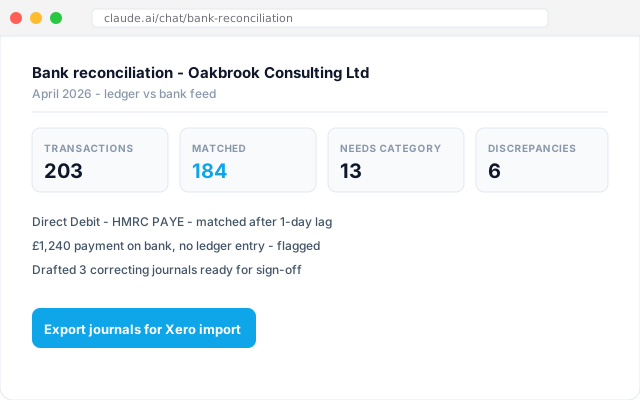
A month-end reconciliation report: total transactions analysed, match rate, the items that need categorisation, the discrepancies with suggested causes, and a set of drafted correcting journals ready to post. The bookkeeper reviews the exceptions. The partner signs the journals.
Follow-up prompts
- Export the correcting journals as a CSV ready for Xero import.
- Draft a client query for the four unmatched payments above £500.
- Run the same reconciliation across the next five clients on the same deadline.
Tricks and tips
- Works the same way against Sage, FreeAgent, Iris, or QuickBooks. Tell the workflow which stack the client is on and it picks up the export shape - the rest of the workflow is identical.
- VAT-inclusive versus exclusive matching trips up generic reconcilers. Tell the workflow which one the ledger uses up front.
- Direct Debits that hit the bank a day before the ledger are the most common false discrepancy. Teach the workflow the one-day lag once, and it is handled.