MTD software for accountants and bookkeepers
Five Making Tax Digital deadlines a year, not five times the admin.
aligned.tax is HMRC-recognised MTD software for accountants and bookkeepers. Collect the spreadsheets your clients already keep, let Smart Map read each workbook, review the exceptions and file the quarterly update to HMRC, all from one practice worklist that shows every client’s HMRC status, whatever they file through.
No credit card · Clients keep the spreadsheets they already use · Status read straight from HMRC.


MTD multiplies every manual step.
Each mandated client now means four quarterly updates a year instead of one return. Every step your practice does by hand today gets done four times over, for every client, in the same few weeks.
- Work out which clients need attention this quarter
- Request records from each of them
- Chase the ones who have not replied
- Work out which client and quarter each file belongs to
- Reformat every different spreadsheet layout
- Review the figures
- File the update
- Do it all again in three months
A practice with 25 spreadsheet clients in MTD
- 100
- quarterly updates a year, instead of 25 returns
- 100
- record requests to send and follow up
- 100
- workbooks to identify, map and review
- 5
- deadline weeks when every client lands at once
Illustrative. The point is not the penalty regime; it is that the same manual steps repeat every quarter, and the software either removes them or it does not.
From missing records to filed update, in one workflow.
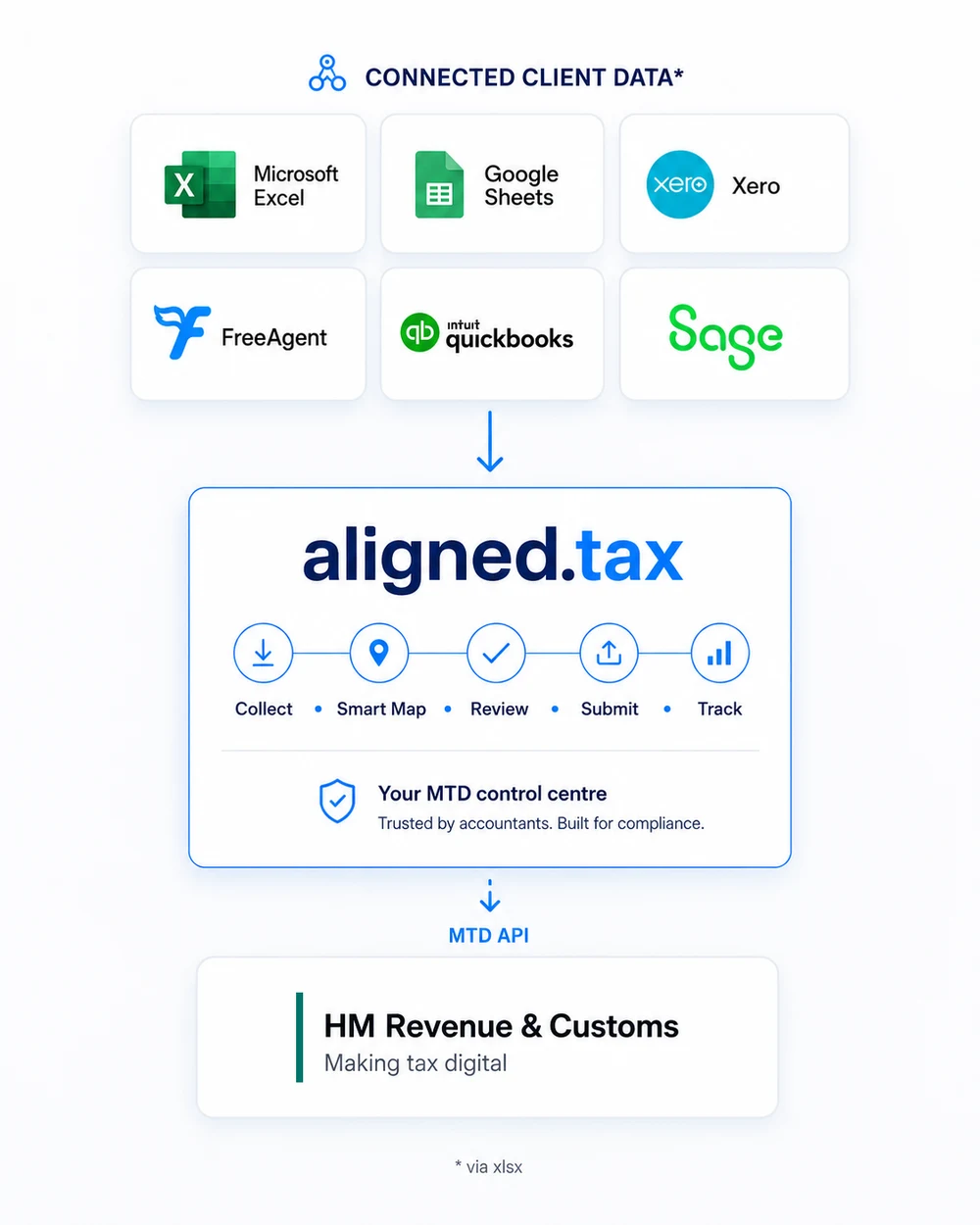
aligned.tax runs the quarter as one loop. Request the records, receive the workbook against the right client and quarter, map it with Smart Map, review the exceptions, file to HMRC and watch the status change. The mapping is remembered, so next quarter starts with less work than this one.
- CollectSend a client a private upload link. What they send lands against that client and that quarter.
- MapSmart Map reads the client’s own column layout and matches it to HMRC’s categories.
- ReviewCheck the mapping and the figures. Change anything. Nothing is filed until you approve it.
- FileSubmit the quarterly update to HMRC through the MTD API, or keep filing elsewhere.
- TrackThe worklist updates from HMRC, and the saved mapping makes next quarter a review, not a rebuild.
Work the exceptions instead of hunting for them.
A status you can only get by logging into five different systems is not a status you can act on. aligned.tax reads every client's obligations straight from HMRC, so the whole practice lands in one list, including the clients who file through Xero, Sage, FreeAgent or their own software. Nothing to compile, nothing to reconcile, and no quarterly spreadsheet of who has filed.
That list is also where the work starts. From the same screen you can request records from a client who has sent nothing, chase one who has gone quiet, and leave the clients HMRC already shows as filed completely alone. Your team spends the quarter on the handful of clients who need attention rather than checking the ones who do not.
The client list is the worklist. That is the difference between knowing where the quarter stands and being able to do something about it.
This quarter, from HMRC
24 clients. 6 need something from your team. 18 do not.
Chasing stops being a job someone has to remember.
Pick the client and the quarter, check the email, and aligned.tax sends a private upload link that lasts 30 days. What they send lands against that client and that quarter automatically. If nothing arrives, Chase resends the same link from the same list, so nobody rebuilds the request or digs through an inbox to work out who replied. Corrected files arrive as new versions; nothing is overwritten.
No attachments. No shared inbox. No “which client was this for?”
AI reads whatever spreadsheet arrives.
Every client sends something different, and none of them need to change. Smart Map, our AI mapping step, reads each client's own column layout and matches it to HMRC's income and expense categories. There is no template to enforce and no re-keying, so the digital link holds all the way to HMRC.
Clients stay on the systems they already know. Excel workbooks upload directly, and Google Sheets, Xero, FreeAgent, QuickBooks, Sage or Numbers records are exported as XLSX first. You review every mapping before anything is filed, and saved mappings are reused next quarter, so a client's workbook is only mapped once.
Recognised identifiers - names, National Insurance numbers, addresses, emails, phone numbers - are redacted before any request is made.
The AI receives a prepared view of the structure, labels and figures, not the original file. It answers with cell references, nothing else.
Every AI request runs with zero data retention and data collection denied, locked into the request itself - a provider that retains data cannot answer. Inputs are never used to train models.
Smart Map only suggests. A member of your team reviews and confirms every mapping before anything is filed.
Found 8 potential mappings in your spreadsheet.
What a practice needs from MTD software
Choosing MTD software for a practice is not about features for one taxpayer. It is about whether the tool holds up across a whole client list.
| What your practice needs | How aligned.tax covers it |
|---|---|
| One view of every client | Quarterly obligations and their status read from HMRC for every authorised client, including updates filed through Xero, Sage, FreeAgent or the client’s own software. |
| Automatic HMRC status checks | Stale client statuses are re-checked with HMRC automatically when you open the workspace, and every check is recorded with a full refresh history. |
| Bulk client upload | Import the whole client list from one XLSX or CSV file - names, NINOs and contact details - instead of adding clients one at a time. |
| A job list, not a client list | Each quarter’s work lands as a job with a status: filed, awaiting records, ready to review or overdue. Request and Chase run from the same screen, one client and quarter at a time. |
| Secure record requests | Each request sends a private upload link that lasts 30 days. The file lands against the right client and quarter, and the client can send a corrected version until the link expires. |
| 1-click chase | One click resends the client’s existing link from the worklist. No rebuilding the request, no hunting through an inbox. |
| Retained upload versions | Every version a client sends is kept, latest first. A corrected file never overwrites the audit trail. |
| Excel import and column mapping | Smart Map reads each client’s own XLSX layout and maps it to HMRC’s income and expense categories. No template to enforce. |
| Quarterly update filing | Files quarterly updates for self-employment and UK property through HMRC’s MTD API, for the clients you choose to file here. |
| Multiple income sources | Sole trade, UK property and foreign property handled per client, including clients with more than one. |
| Digital link integrity | Figures flow from the uploaded workbook to HMRC without manual re-keying, which is what HMRC’s digital-link rule requires. |
| Repeatability each quarter | Saved mappings are reused next quarter, so mapping a client’s workbook is a one-off job. |
| Clear per-client pricing | First 3 clients free, then £1.50 +VAT per active client per month, falling to £1 from the 26th client and £0.75 from the 51st. Free for practices until April 2027. |
What makes it different.
Clients keep the spreadsheets and systems they already use. Records reach aligned.tax as XLSX files.
Collection, mapping and filing in one workflow, so nothing is handed between tools mid-quarter.
The worklist reads each client’s obligations from HMRC, so updates filed through other software show as filed here.
Every mapping and every submission is reviewed by your practice before it goes anywhere.
MTD can be revenue, not just workload.
MTD creates four extra client touchpoints a year. Practices that cut the operational cost of each quarterly update can package MTD as a managed quarterly service instead of absorbing four new deadlines as overhead.
Illustrative only. Practices set their own fees; this is not a recommendation of what to charge.
See practice pricing and the cost calculatorThe filing step, in users' words.
Verified Trustpilot reviews of the upload, map and file route that sits inside the practice workflow. aligned.tax is HMRC-recognised and Cyber Essentials certified, and every client upload link is private to that client and quarter.
We had been struggling for months to establish just what our longstanding accounts software provider planned to offer to make us MTD compliant. With the deadline for the first quarterly submission looming we stumbled upon aligned.tax. What a revelation. Within less than half an hour we managed to register and make our submission to HMRC.
It picked up all the right numbers from my spreadsheet first time. I had to download my Google spreadsheet as an xls version. Other than that all worked smoothly and was easy to follow.
After trying numerous different apps, this is the only one that actually did exactly what it said. Easy, intuitive bridging software to submit MTD accounts. I did what I needed to do in minutes.
Want the full MTD guide for accountants?
A practical guide covering Agent Services Account setup, client authorisation, pricing strategies, and practice workflow planning.
Read the MTD guide for accountantsFrequently asked questions
Yes. aligned.tax completed HMRC's production approval process in July 2026 and is officially HMRC-recognised software for Making Tax Digital for Income Tax. All submissions go through HMRC's official MTD API. 'Recognised' is HMRC's own term - HMRC does not approve or endorse individual products.
Yes. An authorised agent can keep digital records, file quarterly updates and complete the year-end process on a client’s behalf. Your practice needs an Agent Services Account with the client’s authorisation linked to it, plus HMRC-recognised MTD software such as aligned.tax to make the submissions.
No. Keeping records in a spreadsheet and filing through bridging software is a valid, ongoing way to meet Making Tax Digital, not a temporary workaround. The rule is the digital link: once figures are in the spreadsheet they must flow to HMRC without manual re-keying, which is exactly what aligned.tax does.
Each mandated client means four quarterly updates plus the year-end process instead of one annual return: from April 2026 for clients with qualifying income over £50,000, April 2027 for over £30,000. The workload moves from an annual peak to a quarterly rhythm, so the practices that do well are the ones that run MTD as one repeatable workflow rather than a per-client scramble.
There is no set rate. Many practices package MTD quarterly work as a fixed monthly or quarterly fee on top of the annual engagement, rather than absorbing four extra deadlines as overhead. With software from £1.50 +VAT per active client per month, most of a packaged fee is margin for the practice’s review work.
Yes. Once your Agent Services Account holds the client’s authorisation, you can sign the client up through HMRC’s “sign up your client for Making Tax Digital for Income Tax” service on GOV.UK, with their name, National Insurance number, date of birth and UTR to hand. After sign-up, quarterly updates are filed through recognised software.
Yes. aligned.tax reads each client’s quarterly obligations from HMRC, not from another vendor’s product, so a single client list shows HMRC’s own status for every client authorised to your Agent Services Account. An update filed through Xero, Sage, FreeAgent or the client’s own software still shows as fulfilled here. You do not have to file through aligned.tax to monitor a client in it.
No. You can use aligned.tax purely as your practice view of who has filed, who is outstanding and who is overdue, and keep filing wherever you file today. Filing here is an option for the clients it suits, typically the ones who send you a spreadsheet.
Smart Map is an AI step that reads the client’s own column layout and matches each column to the right HMRC income or expense category, so there is no fixed template for clients to follow. You review and can change every mapping before anything is submitted, and the mapping is saved and reused for that client next quarter. Figures are processed in transit and not retained by the AI provider.
Without spreadsheets going back and forth by email. Pick the client and the quarter, review the email, and aligned.tax sends that client a private upload link that lasts 30 days. The uploaded workbook appears against the right client and quarter in your practice workspace, the worklist shows who is still outstanding, and Chase resends the same link to anyone who has gone quiet.
Not yet. Today each request and each Chase is sent for one client and one quarter from the practice worklist, so you can check the email before it goes. Sending requests and reminders to several clients in one action is in development.
Not yet. Chase is a manual action: one click from the worklist resends the client’s existing link without extending its expiry, and you can see who has been asked and when. Scheduled reminder sequences are in development. Deadline reminders inside the app tell your team what is due, not your clients.
Yes. aligned.tax is designed for practices managing multiple clients, with one dashboard for spreadsheet review and quarterly filing.
No. Clients can keep their existing spreadsheets and aligned.tax helps map the columns to the right HMRC fields.
You can start now. Create a free account, add your clients, connect to HMRC, and file their quarterly updates from the spreadsheets they already send. No credit card required.
Free until April 2027 - unlimited clients, no card. From the 2027/28 tax year it is £1.50 +VAT per active client per month, falling to £1 from your 26th client and £0.75 from your 51st, with your first three clients free forever. A client only counts once their first live filing succeeds, all of their income sources are included, and there are no seat fees. Full details and a cost calculator are on the pricing page.
aligned.tax accepts .xlsx files. Smart Map handles arbitrary column orders and bespoke headers, so each client can keep the workbook they already send you. If it is in another format, save or export it as .xlsx before upload.
Yes. Clients do not need re-onboarding onto a new accounting package. You can keep the existing spreadsheet workflow and, where it suits your practice, run aligned.tax alongside current software during the changeover. The systems must maintain the required digital links and collectively meet HMRC minimum functionality.
Usually. Add each Self Assessment agent code to your Agent Services Account and HMRC will add the existing authorisations linked to that code. Those relationships make you the main agent, but you or the client must still sign up each eligible client for MTD. New clients without an existing Self Assessment authorisation use a digital-handshake link, which expires after 21 days.
Once a client is mandated into MTD ITSA they stay in unless they opt out, and opt-out is only available after three consecutive tax years below the applicable threshold. There is no obligation to opt out, so clients may also choose to remain on MTD for continuity.
Yes. HMRC allows you to use more than one compatible product for a single client provided they work together and collectively meet the minimum functionality. aligned.tax slots in as the bridging step from spreadsheet to HMRC, but the digital link must be maintained between systems with no manual re-keying.
Last updated:
Run the next quarter from one worklist.
Free for individuals, always. Practices start with three clients free. No credit card, no setup.