Describe the task
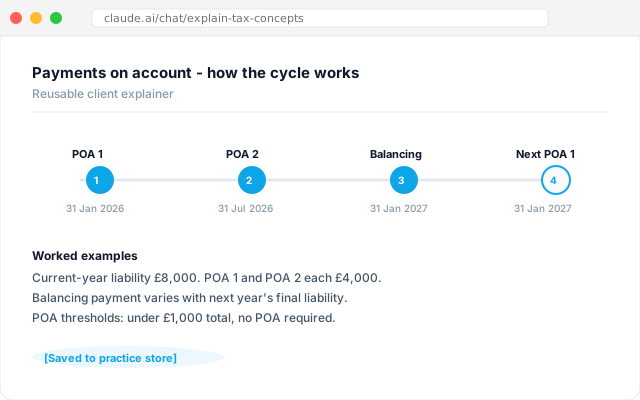
Talk through how you want to explain payments on account, annual investment allowance, or the new MTD ITSA rules. The workflow sketches alongside as you talk. First pass is the advisory call itself. Save the visual and it becomes a reusable asset for every client handler to drop into the next conversation.
Give the workflow context
An AI workflow connected to the practice document store with the concept as you teach it day-to-day, the examples you usually reach for, and any prior client explainers. It respects the practice's house tone - formal, chatty, or somewhere in between - and keeps the visual on-brand.
What the workflow creates
The visual, built live. Timeline for payments on account. Rate bars for AIA. Cycle diagrams for MTD ITSA. Saved back to the practice document store as a reusable client asset, indexed by concept, versioned by tax year.
Follow-up prompts
- Build the same explainer for the spouse of a sole trader moving into MTD ITSA. Tweak the scale for household income.
- Refresh the AIA explainer for the current Budget's rates and flag anything that has shifted.
- Package the top 10 client explainers as a single PDF handbook for new joiners to the practice.
Tricks and tips
- Build the visual with the partner who uses the concept most. Do not delegate the framing - it is the expertise of the practice, shaped into a reusable asset.
- Store the finished visuals in the practice document store by concept, not by client. The point is reuse.
- Revisit the visual after a Budget or HMRC guidance update. Ask the workflow what changed and let it redraft.