Describe the task
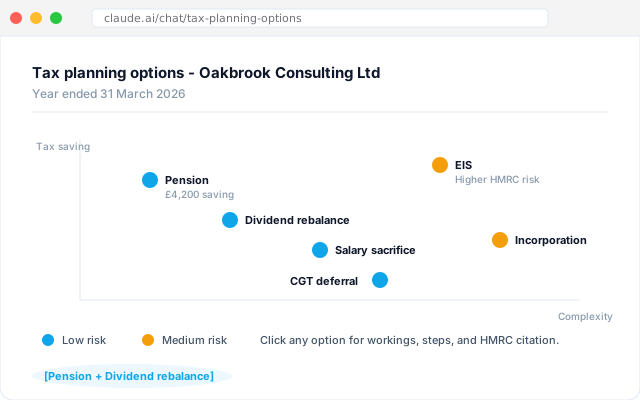
Ask the workflow to plot every planning option for a client in one view. Tax saving along one axis, implementation complexity along the other, with HMRC risk and partner time required shown alongside. Filter, test scenarios, ask for a prioritisation, narrow down together. The client sees the reasoning at the same time as the recommendation, which tends to shorten the follow-up.
Give the workflow context
An AI workflow connected to the practice document store with the client's current-year numbers, last year's return, and the correspondence file. It respects the house view on acceptable risk levels and flags any option that sits outside the practice's usual risk tolerance. Read access to HMRC guidance the practice subscribes to.
What the workflow creates
A scatter view of every option plotted against the four axes. Click any point for the supporting numbers, the implementation steps, and the citation back to HMRC guidance. A short prioritisation list underneath, ordered by tax saving per hour of partner time. Ready for the advisory meeting, not as a pre-cooked recommendation.
Follow-up prompts
- Filter out any option flagged as medium or high HMRC risk. Rerun the prioritisation on what is left.
- Show the same view for the client's spouse and any connected company. Are there cross-entity savings we are missing?
- Draft the client-facing summary in our house advisory voice, ready for partner review.
Tricks and tips
- Let the client see the full view, not just the recommendation. The collaborative bit is where the fee justifies itself.
- Be explicit about the risk axis. The workflow is conservative by default, which is what you want in this workflow.
- Save the view alongside the client file as the record of the conversation. Two years on you will want the reasoning trail.