Describe the task
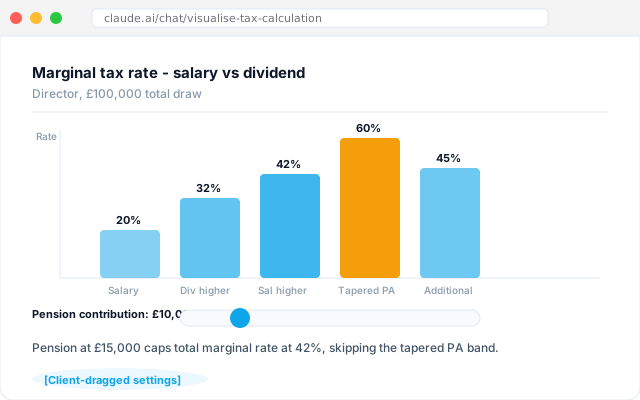
Ask the workflow to build the interactive tax visual for this client, live, in the meeting. Marginal rates, dividend versus salary, pension contributions, Business Asset Disposal Relief thresholds. Shape it to the client's specific circumstances. Let them drag the sliders. The reaction when the bars redraw is where the fee starts earning itself.
Give the workflow context
An AI workflow connected to the practice document store with the client's current-year return, prior-year return, and salary/dividend history. It respects the practice's house view on acceptable positioning and cites any rate or threshold back to HMRC guidance. Read access only - the visual is a view, not a submission.
What the workflow creates
An interactive tax visual rendered inline. Rate bars that redraw as sliders move. One-line reads under each scenario showing the effective rate at that point. The final settings captured back into the client file as the advice record.
Follow-up prompts
- Show the same visual for the client's spouse. Where do the marginal rates diverge?
- Rerun with a pension contribution of £20,000 and a Business Asset Disposal Relief disposal in the same year.
- Export the final settings to the client file as a record of the advice given.
Tricks and tips
- Run it once in a dry-run meeting before you take it to the client. The muscle memory of driving the sliders matters.
- Let the client drag the sliders. The reaction is the point of the workflow.
- Capture the settings at the end of the meeting as the advice record. Two years on you will want the reasoning trail.