Managing Your Income Sources
What this is
This page lists the businesses and property income sources HMRC holds for the taxpayer under Making Tax Digital. They are the things you file quarterly updates for. aligned.tax does not create them; it shows what HMRC has and lets you ask HMRC again.
What you see on screen
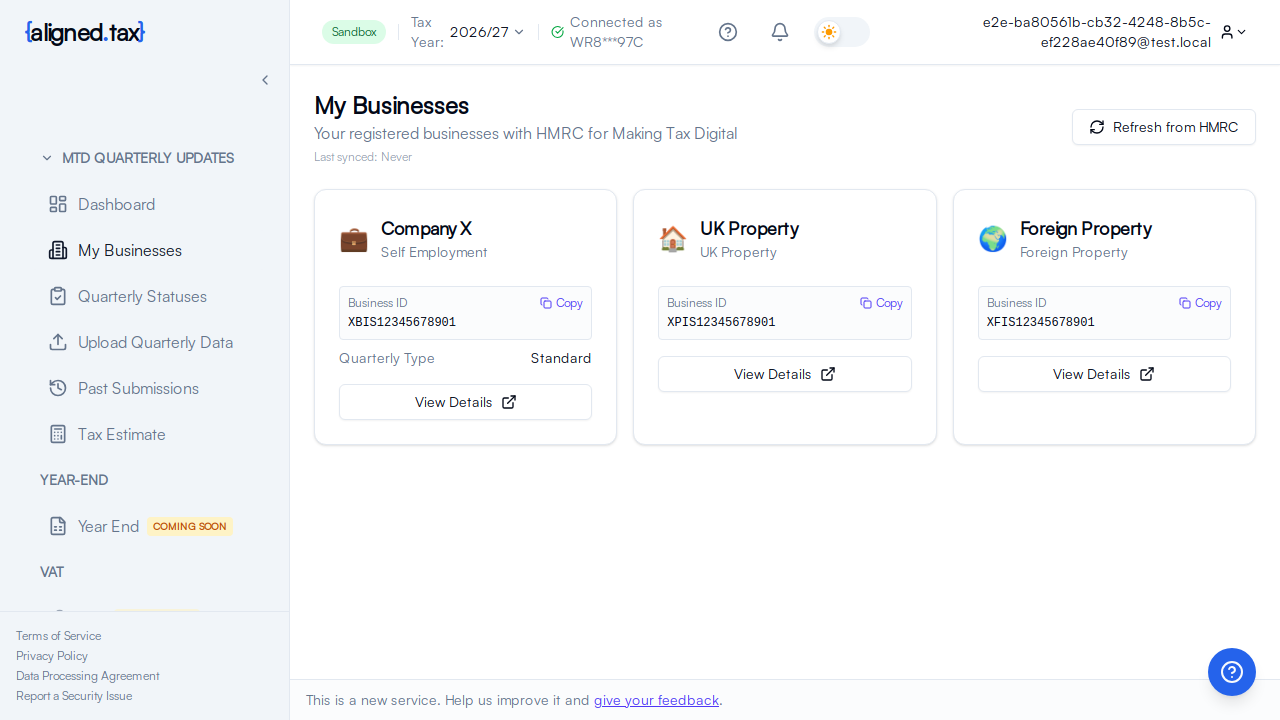
Individuals open My businesses in the sidebar; the page is titled My Businesses, “Your registered businesses with HMRC for Making Tax Digital”. Agents open Income Sources, which shows the client chosen in the header switcher.
The page shows:
- Last synced with the time of the last HMRC refresh, and a Refresh from HMRC button
- A card for each income source with the trading name (or the property type), the income type (Self Employment, UK Property or Foreign Property), the HMRC Business ID with a Copy button, and a View Details button
If the account is not connected to HMRC, the page says Not connected to HMRC and offers Connect to HMRC instead of a list.
How to
Refresh the list from HMRC
- Click Refresh from HMRC.
- Wait for Last synced to update.
Do this after registering a new business with HMRC, after a business has ceased, or when a source you expect is missing.
Open a business
Click View Details on its card. The business detail page shows its accounting type, update periods, address and the quarters for the selected tax year.
Things to know
- Income sources are registered with HMRC, not in aligned.tax. If one is missing after a refresh, the registration is missing at HMRC’s end. Register it with HMRC first.
- Three income types are supported: self-employment, UK property and foreign property. Each has its own quarterly obligations and its own HMRC fields. Foreign property is supported for the 2026-27 tax year onwards.
- The Business ID is HMRC’s identifier for the source. aligned.tax uses it when submitting; you never need to type it, but support may ask for it.
- One card per source, not per property. A UK property business is one income source however many properties it contains.
- Agents: the list follows the client switcher. If the cards look wrong, check which client is selected in the header.
FAQ
A business I closed still appears. Why?
HMRC still holds it. A ceased business keeps its record and shows a cessation date on the detail page. Obligations stop from the cessation date.
Can I add a business here?
No. Businesses come from HMRC’s records. Register with HMRC, then click Refresh from HMRC.
Why does the page say the business was not found?
The detail page asks HMRC for the business by its Business ID. If HMRC returns nothing, the business may have been removed at HMRC’s end or belong to a different client than the one selected. Go back, check the client switcher and refresh.