Understanding Your Obligations
What this is
An obligation is one quarterly update HMRC expects for one income source: a period, a deadline, and a status that says whether HMRC has received it. Individuals see their obligations on Home; agents and individuals can both open Quarterly Statuses for the full table, which is the page to check when you want to know exactly what HMRC has.
What you see on screen
Quarterly Statuses at /app/quarterly-statuses, “Check whether HMRC has received your quarterly updates”, shows:
- Last updated and a Refresh from HMRC button
- One block per income source, headed with its name, type and a count such as “0/4 fulfilled”
- A table with the columns Obligation period, Due date, HMRC status, Days remaining and Received date
The periods are cumulative: “6 Apr - 5 Jul”, “6 Apr - 5 Oct”, “6 Apr - 5 Jan”, “6 Apr - 5 Apr”. The statuses are:
- Open - HMRC has not received an update for this period. Days remaining counts down to the due date.
- Overdue - the due date has passed and HMRC has nothing. The column shows how many days overdue.
- Fulfilled - HMRC has received the update. Received date shows when.
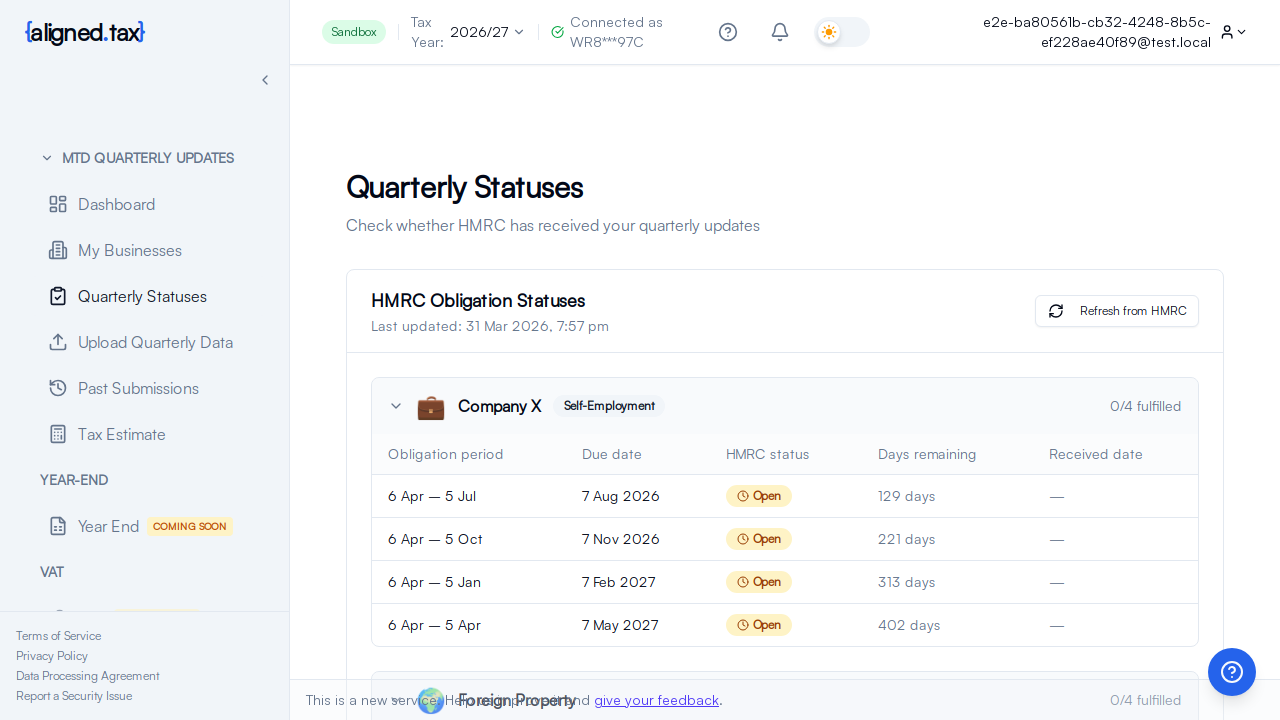
Agents see the client chosen in the header switcher. With no obligations for the selected year the page says No obligations found for that year and suggests refreshing or choosing a different tax year.
On Home, individuals see the same quarters as cards under Your Tax Year at a Glance, with the extra states Not open yet (the period has not ended) and Locked (an earlier quarter must be filed first). See Your Dashboard.
How to
Check what is due
- Open Quarterly Statuses in the sidebar (individuals can also read the same from Home).
- Look for Open and Overdue rows. Days remaining tells you which needs attention first.
- Check the Tax Year in the header if the quarters you expect are missing.
File an open quarter
- Open Quarterly updates in the sidebar.
- On File a quarter, choose the business and click Upload Data on the quarter.
- Follow the three steps: your spreadsheet, check your figures, send to HMRC. See Uploading a Spreadsheet.
Confirm HMRC has received an update
- Click Refresh from HMRC.
- Wait for Last updated to change. The row moves to Fulfilled with a Received date.
HMRC can take up to an hour after accepting an update to show it as fulfilled. The receipt on the success screen and in Past submissions is your confirmation in the meantime.
Things to know
- The dates are HMRC’s. aligned.tax never calculates periods or deadlines; it shows what HMRC issued for the registration.
- Updates are cumulative and filed in order. Each period runs from 6 April. Q2 contains Q1’s figures plus Q2’s, and a later quarter cannot be filed before an earlier one. See Cumulative Quarterly Updates.
- A quarter opens when its period ends. Until then Home shows it as Not open yet with the date it opens, and the upload page will not offer it.
- Fulfilled anywhere counts. An update filed through other software shows as Fulfilled here after a refresh, because the status comes from HMRC.
- Overdue quarters can still be filed, and should be. Penalty points and late-submission rules are HMRC’s; see The Penalty-Free Period.
- Each income source has its own obligations. A self-employment business and a property business each have four quarters, on the same or different dates depending on the update periods chosen for each.
FAQ
Why is a quarter still Open after I submitted?
HMRC has not yet reflected the acceptance, which can take up to an hour. Check Past submissions for the receipt, wait, then click Refresh from HMRC.
Why do I see 6 Apr - 5 Oct instead of 6 Jul - 5 Oct?
Because quarterly updates are cumulative: each one covers the tax year to the end of that quarter. The figures you send for Q2 include Q1.
Can I file early?
Once a period has ended, yes: an Open quarter can be filed any time before its due date. A period that has not ended cannot be filed.