Describe the task
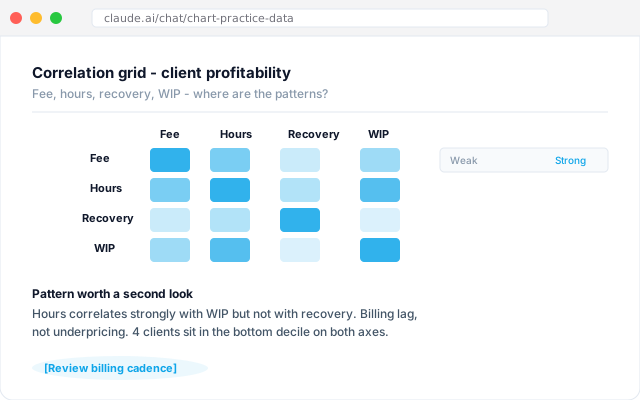
Hand the workflow a CSV export from the time recording system or the practice management tool. Ask for the correlation grid across fee, hours, recovery rate, and WIP. Click into whichever cell looks interesting. Use it to check a hunch about which clients are unprofitable before the awkward fee conversation, or to see which partners carry the best recovery.
Give the workflow context
An AI workflow connected to the practice management system and the time recording export. It reads the current-year and prior-year data, understands the practice's fee structure, and respects the partner's note on which clients are strategically important beyond fee recovery alone.
What the workflow creates
A correlation grid rendered inline with the cells shaded by strength of association. Two or three flagged patterns worth a second look, each with a one-line observation and a link back into the underlying data. Ready for the partner meeting, not as a black-box number.
Follow-up prompts
- Show the bottom decile of clients by recovery. Which fee-earner carries most of them?
- Rerun the grid with last year's data side by side. Has the pattern shifted or held?
- Draft the talking points for the fee review conversation with the three clients flagged at the bottom.
Tricks and tips
- Start with one variable pair you already have a hunch about. Validate the method before you ask for the full grid.
- Strip PII from the CSV before upload if you are not on an enterprise plan. Client codes work fine in the grid.
- Keep the correlation as a conversation starter, not a conclusion. The grid points at questions to ask next, not answers to act on.