Your Dashboard
What this is
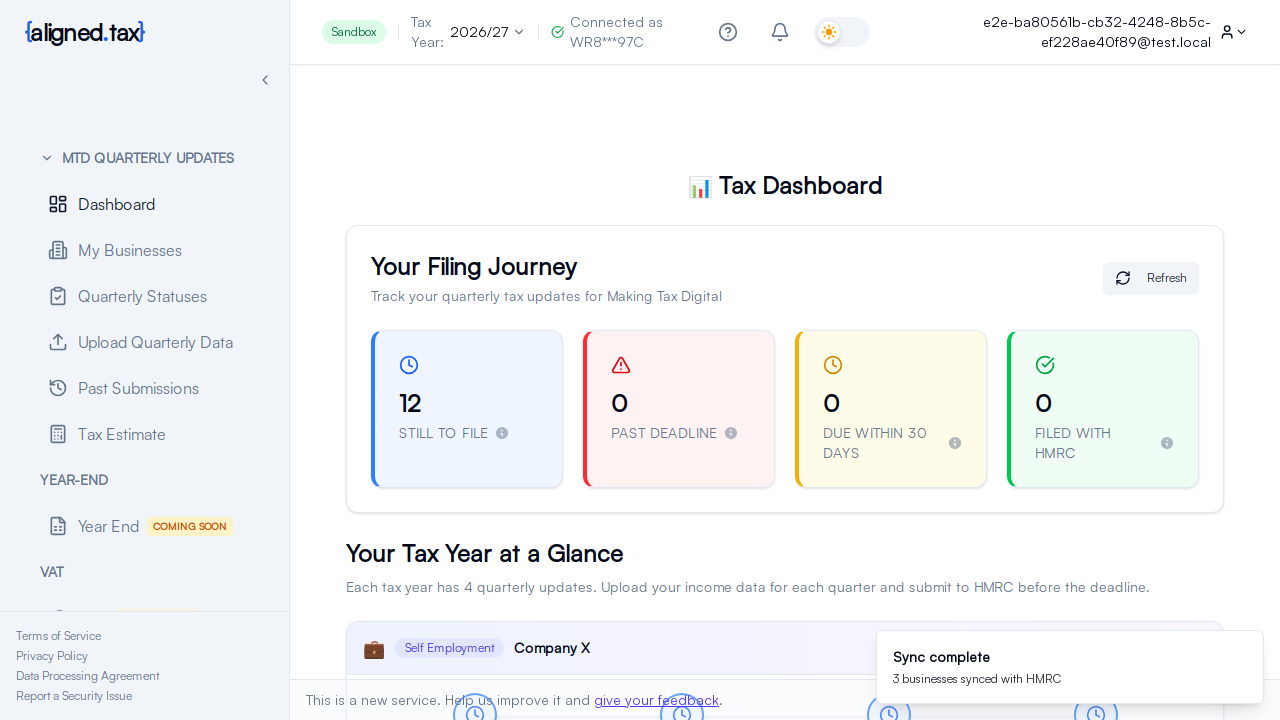
Home is where you land after signing in. It tells you in one line what, if anything, needs doing, then shows every quarter of the selected tax year with its status. Once HMRC is connected it is the quickest way to see what is due and to start filing.
What you see on screen
The greeting at the top (“Good morning”, “Good afternoon”, “Good evening”) is followed by a one-sentence summary such as “One thing needs doing. Quarter 1 for your self-employment business is due by 7 August”, or “You’re all caught up. Your next update opens on 25 September”.
Until setup is finished, a You’re nearly set up card lists the five steps with a progress bar: create your account, verify your mobile, connect to HMRC, check your HMRC data, file your first quarterly update. The next step has its own button, for example Start quarter 1.
Your Filing Journey shows four counts for the selected tax year:
- Still to file
- Past deadline
- Due within 30 days
- Filed with HMRC
Each has a small What is …? button that explains the count. A Refresh button asks HMRC for the latest obligations and businesses.
Your Tax Year at a Glance lists each business with its quarters, for example “Demo Plumbing - 1/4 filed”, and for every quarter (Q1 to Q4) the cumulative period it covers, such as “6 Apr - 5 Jul” or “6 Apr - 5 Oct”, and one of these states:
- Filed - HMRC has received this quarter
- Not open yet - the quarter’s period has not ended; it shows the date it opens (“Submit from 25 Sept”)
- Locked - “File earlier quarters first”
- An open quarter shows its due date and an Upload Data button
How to use your dashboard
Start filing a quarter
- Find the open quarter under Your Tax Year at a Glance, or use the action button in the summary card.
- Click Upload Data (or Start quarter 1 on the checklist). The upload journey opens with that quarter already chosen.
- Follow the three steps: your spreadsheet, check your figures, send to HMRC.
Check what HMRC holds
Click Refresh in Your Filing Journey. aligned.tax asks HMRC for your businesses and obligations again and shows “Sync complete” when done. Do this if a quarter you filed elsewhere is not showing as filed, or after HMRC has told you something has changed.
See a different tax year
Use the Tax Year dropdown in the header. Every count and every quarter on the page follows it.
Things to know
- Quarters are cumulative. Each period starts on 6 April, so Q2 covers 6 April to 5 October, not July to October. When you file Q2 you send the year so far and HMRC keeps only the latest figures. See Cumulative Quarterly Updates.
- Quarters open when their period ends and must be filed in order. A locked quarter unlocks when the earlier one is filed.
- The dates come from HMRC. aligned.tax shows the periods and due dates HMRC holds for your registration; it does not calculate them.
- A filed quarter can take up to an hour to show as fulfilled after HMRC accepts it. The receipt on the success screen is your confirmation in the meantime.
- Nothing here needs a person at aligned.tax. If the page shows a problem with HMRC, the header status chip and the message on the page say what HMRC reported.
FAQ
Why does Home say nothing is due when I know I have a quarter to file?
Check the Tax Year in the header. Home only shows the selected year. If the year is right, click Refresh so aligned.tax asks HMRC again.
Why is a quarter locked?
Making Tax Digital updates are filed in order, and each one contains the year so far. Until the earlier quarter is filed, the later one cannot be.
I filed a quarter through other software. Will it show here?
Yes, after a Refresh. HMRC is the source of truth, so a quarter fulfilled anywhere shows as Filed here. It will not appear in Past submissions, which only lists what was sent through aligned.tax.