Authorising a client with HMRC for MTD Income Tax
Before you can submit quarterly updates or a tax return for a client, HMRC must confirm you are authorised to act. Most new relationships use a digital-handshake link the client approves in their own Government Gateway sign-in. Existing Self Assessment relationships may confirm after you add the relevant agent code in your Agent Services Account.
What this is
HMRC will only let you see a client’s Making Tax Digital data or file for them once it has recorded that the client authorised your practice. That usually means an invitation: aligned.tax creates it with HMRC, you send the client the link, the client approves it with their own Government Gateway sign-in, and HMRC confirms. If you already act for the client through your Agent Services Account, HMRC may confirm the relationship straight away and no invitation is needed.
What you see on screen
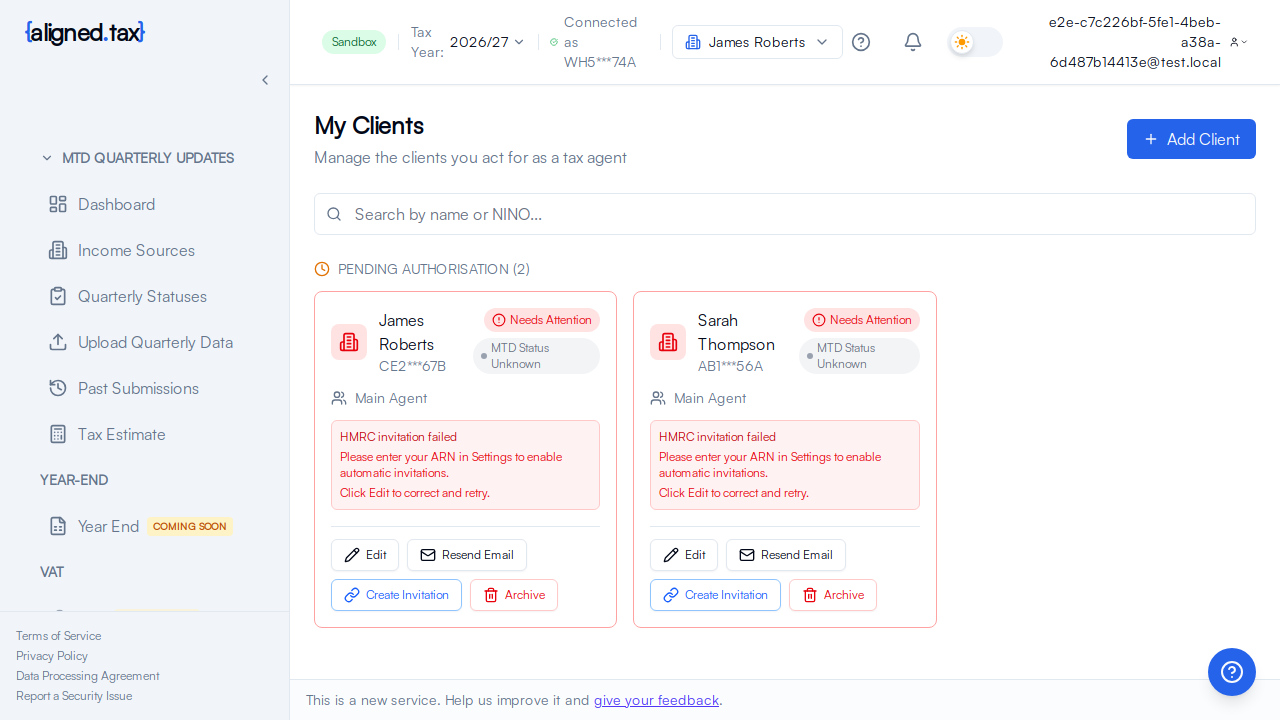
The Authorisation card on the client’s page shows HMRC’s latest answer and a four-step timeline: Invite created, Invite sent, Client relationship, HMRC data synced.
- Just after adding a client, the card reads No active HMRC relationship (“HMRC has no record that you can act for” the client) with Send invitation, Refresh HMRC data and Remove old authorisation
- While the client has the link, the workspace row shows Waiting for the client and how many days the invitation has left, with Resend invitation email
- Once HMRC confirms, the card reads HMRC confirmed you can act for the client, “Your practice is authorised to act for this client”, with Remove authorisation
How to authorise a client
- Open the client from the Practice workspace.
- Click Send invitation. Review the email, which carries the HMRC link, and send it, or copy the link to share it another way.
- Ask the client to open the link and sign in with their own Government Gateway user ID and password, the one for their Self Assessment, and approve your practice.
- Click Refresh HMRC data on the client page, or Refresh all HMRC data on the workspace. The card changes to HMRC confirmed you can act for the client and the timeline fills in.
- aligned.tax then fetches the client’s income sources and quarterly obligations for the selected tax year.
Once authorisation is in place, the practice workflow is collect → map → review → submit → track. See MTD software for accountants.
Things to know
- Your Agent Reference Number must be confirmed first. Without it aligned.tax cannot create an invitation; the workspace setup card and Settings both show the ARN state.
- The client needs a valid email, National Insurance number and postcode. The postcode is checked with HMRC when the client is added, so authorisation is never blocked by a typo you did not notice.
- The link expires after 21 days. After that, create a new invitation from the client page; the old one no longer works.
- HMRC’s status is only as fresh as the last check. The card shows when HMRC was asked. If the client says they approved, refresh.
- The client must use the right HMRC account. People often have more than one Government Gateway login. Approval has to be done with the one registered for the tax the invitation covers.
- Authorisation can be withdrawn by the client or HMRC. The card then goes back to No active HMRC relationship and you start again.
If something goes wrong
The client did not receive the email. Click Resend invitation email on the workspace row, or open the client page and copy the link.
Stuck on Waiting for the client. They have not completed the approval. Ask them to open the link, sign in with the correct Government Gateway account and approve. If the link has expired, send a new invitation.
The client cannot sign in at HMRC. Send them to GOV.UK’s HMRC online services help. Neither you nor aligned.tax can reset their Government Gateway details.
HMRC confirmed the relationship but the client shows Not signed up to MTD. Authorisation and MTD registration are separate. The client must be signed up for Making Tax Digital for Income Tax with HMRC; then Refresh HMRC data.
FAQ
How long does authorisation take?
As long as the client takes to approve. HMRC confirms within minutes of the approval; refresh to pick it up.
Do I need a separate invitation for each tax year?
No. The relationship covers the client, not a year.
Can a supporting agent be authorised the same way?
Yes. Choose Supporting agent when adding the client; the invitation is for that role.