Next Making Tax Digital quarterly update deadline: 7 November 2026.Start filing now

How to fill it in

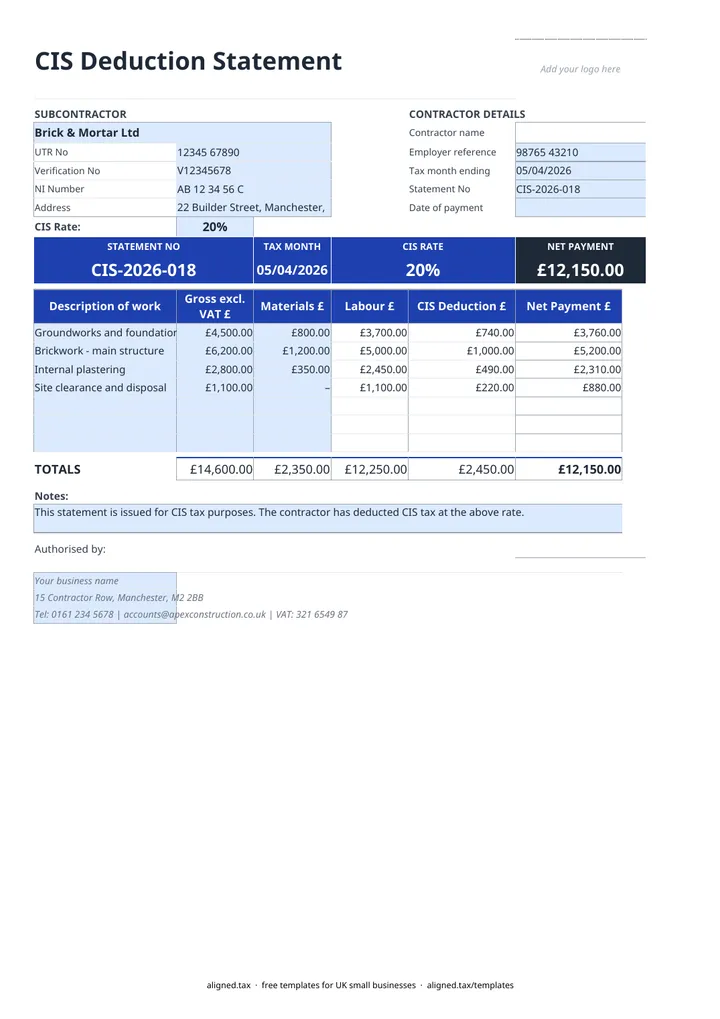
  1. Type your business name and contact details in the blue footer cells at the bottom of the CIS Statement sheet. Contractor name fills in from them.

  2. Under CONTRACTOR DETAILS, enter your Employer reference, the Tax month ending date (the 5th), the Statement No and the Date of payment.

  3. Under SUBCONTRACTOR, enter the name, UTR No, NI Number and Address. Add the Verification No if you are deducting at 30%.

  4. Choose the CIS Rate: 20% standard, 30% higher rate or 0% for gross payment status.

  5. List each item of work with its Gross excl. VAT £ and Materials £. Labour £, CIS Deduction £ and Net Payment £ calculate on each line and in TOTALS.

  6. Sign in Authorised by, save a copy for this subcontractor and tax month, and give it to them within 14 days of the end of the tax month.

A CIS payment and deduction statement tells a subcontractor how much you paid them in a tax month and how much Construction Industry Scheme tax you took off. This free Excel template does the sums: list each job with its gross amount and materials, choose the rate, and it works out labour, the deduction and the net payment.

How is the CIS deduction calculated?

The deduction is a percentage of labour only. For each line the template takes the gross amount (excluding VAT), subtracts materials, and applies the rate you choose:

Rate When it applies
20% Subcontractor registered for CIS (the default)
30% Subcontractor not registered, or HMRC could not verify them
0% Subcontractor has gross payment status

For example, a £4,500 job with £800 of materials gives £3,700 of labour. At 20% the deduction is £740 and the subcontractor receives £3,760. Deductions are rounded to the penny, and if materials ever exceed the gross amount, labour is treated as zero.

What details go on the statement?

The template follows HMRC’s CIS 340 guidance. It asks for your employer reference and the tax month ending date rather than your UTR, and it shows the gross paid, materials, deduction, rate and net payment. The verification number is only needed when you deduct at 30%. Every statement should carry its own statement number and date of payment, so save one copy per subcontractor per month.

Are you a subcontractor receiving these?

CIS deductions count as advance payments towards a subcontractor’s tax and National Insurance bill. Keep every statement you receive with your accounts. If your self-employed income is over the MTD threshold, those records also feed your quarterly updates, so read how Making Tax Digital for sole traders works.
CIS payment and deduction statement template: FAQs

Is this template free?

Yes. The CIS statement template is free to download; you just enter your email address to get the Excel file.

What must a CIS payment and deduction statement show?

Your name and employer reference, the end date of the tax month, the subcontractor's name and UTR, the gross amount paid, the cost of materials and the amount deducted. The verification number is needed only when you deduct at the 30% higher rate.

Is the CIS deduction taken from materials?

No. The deduction applies to labour only: the gross payment less VAT and the materials the subcontractor paid for. The template takes materials off each line before applying the rate, and never lets labour fall below zero.

When must I give the statement to my subcontractor?

Within 14 days of the end of each tax month. A CIS tax month runs from the 6th of one month to the 5th of the next, so a statement for the month ending 5 May is due by 19 May.

When it is time to file, use aligned.tax

Keeping your records in Excel? Read our guide to Making Tax Digital for sole traders to see how aligned.tax sends your quarterly update to HMRC from an .xlsx file. Free for individuals, see pricing.

Using the Google Sheets copy? Download it as an Excel (.xlsx) file before uploading it to aligned.tax.