Next Making Tax Digital quarterly update deadline: 7 November 2026.Start filing now

How to fill it in

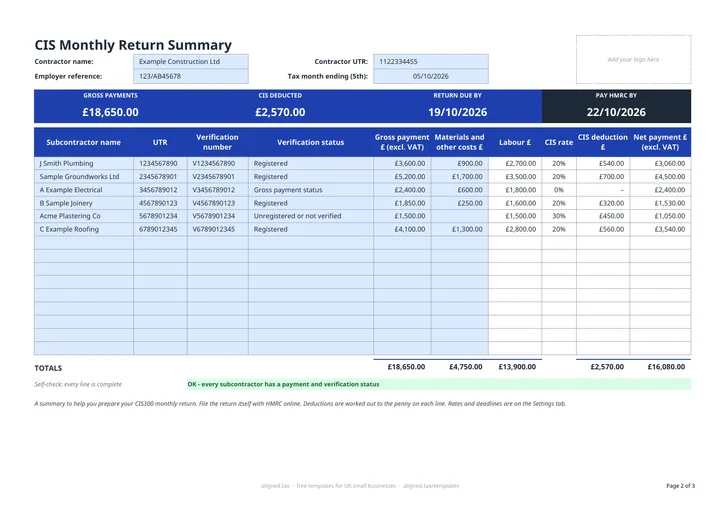
  1. On the CIS Monthly Return tab, enter your Contractor name, Contractor UTR and Employer reference.

  2. Enter the Tax month ending (5th) date. The band shows RETURN DUE BY and PAY HMRC BY for that month.

  3. For each subcontractor paid in the month, enter the Subcontractor name, UTR and Verification number, and choose the Verification status: Gross payment status, Registered, or Unregistered or not verified.

  4. Enter the Gross payment £ (excl. VAT) and the Materials and other costs £ the subcontractor paid for.

  5. Labour £, CIS rate, CIS deduction £ and Net payment £ fill in on each line. Check the TOTALS row and the self-check line, which flags missing details or materials above the payment.

  6. Use the totals to complete your CIS300 return online with HMRC, then start a new copy for the next tax month.

A CIS monthly return tells HMRC what you paid each subcontractor in a tax month and how much Construction Industry Scheme tax you deducted. This free Excel template works it out first: list each subcontractor’s payment and materials, set their verification status, and it applies the right rate, totals the month and shows when the return and payment are due.

Which CIS rate applies?

The rate follows the verification status you choose for each subcontractor, so you do not type it by hand:

Verification status CIS rate
Gross payment status 0%
Registered 20%
Unregistered or not verified 30%

The deduction is worked out on labour: the gross payment (excluding VAT) less materials, consumables, fuel (except for travel), plant hire and manufacturing or prefabrication costs the subcontractor paid for. Net payment is the gross payment less the deduction, so the subcontractor is still paid for their materials.

What are the monthly CIS deadlines?

For each tax month ending on the 5th:

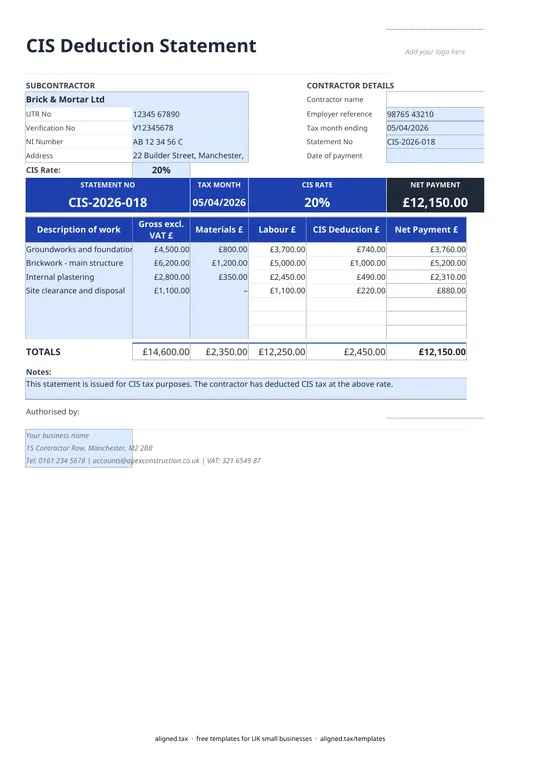
  • give every subcontractor a payment and deduction statement within 14 days
  • send the CIS300 monthly return by the 19th
  • pay HMRC by the 22nd, or the 19th if paying by posted cheque

The rates and deadline days sit on the Settings tab, checked against GOV.UK on 14 October 2026. If anything changes, update the blue cell there once.

Keeping CIS records alongside your accounts

The template stores UTRs and verification numbers as text, so leading zeros survive. Save a new copy for each tax month and keep it with the return you filed. If you are also a sole trader and your own income is above the MTD threshold, your business records need to support quarterly updates too. The MTD for sole traders guide explains what that involves.
CIS monthly return template for contractors: FAQs

Is this template free?

Yes. The CIS monthly return template is free to download; you just enter your email address to get the Excel file.

When is the CIS monthly return due?

By the 19th of the month in which the tax month ends. CIS tax months run from the 6th to the 5th, so the return for the tax month ending 5 November is due by 19 November.

When do I pay the CIS deductions to HMRC?

By the 22nd of the month in which the tax month ends (22 November for the tax month ending 5 November), or the 19th if you pay by cheque in the post. CIS deductions are paid through your PAYE bill.

Do I need to file a return if I paid no subcontractors?

Yes, unless you have told HMRC you are inactive. Otherwise you need to file a nil return for that month.

Does this file the return for me?

No. It is a working summary to help you prepare the CIS300 return. You file the return itself with HMRC online.

When it is time to file, use aligned.tax

Keeping your records in Excel? Read our guide to Making Tax Digital for sole traders to see how aligned.tax sends your quarterly update to HMRC from an .xlsx file. Free for individuals, see pricing.

Using the Google Sheets copy? Download it as an Excel (.xlsx) file before uploading it to aligned.tax.