Next Making Tax Digital quarterly update deadline: 7 November 2026.Start filing now

How to fill it in

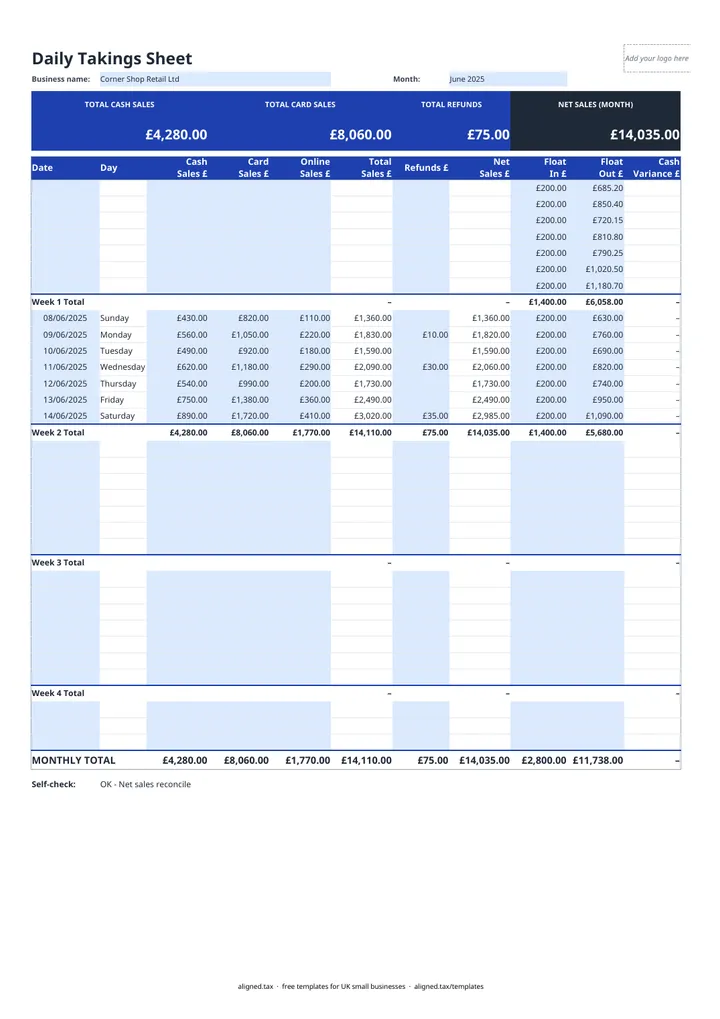
  1. On the Daily Takings tab, enter your business name and the Month. Use a fresh copy each month.

  2. For each trading day, enter the Date, then Cash Sales £, Card Sales £, Online Sales £ and any Refunds £. A row only counts once it has a date.

  3. Total Sales £ and Net Sales £ calculate for each day, for each block of seven rows (Week 1 Total to Week 4 Total) and for the MONTHLY TOTAL.

  4. To check the till, enter the Float In £ you started the day with and the Float Out £ counted at close. Cash Variance £ shows whether the till is up or down.

  5. Check the Self-check line. It confirms the monthly figures agree with the weekly totals and warns if takings are typed on a row with no date.

This free daily takings sheet is a month-long cash-up record for UK shops, cafés, salons and market traders. Each day you enter cash, card and online sales and any refunds, and the sheet totals the day, each week and the month. Enter the till float at opening and close to see if the till is up or down.

What each row records

Column What to enter
Date The trading day (dd/mm/yyyy)
Cash, Card and Online Sales £ Takings by payment type
Refunds £ Money given back to customers
Float In £ and Float Out £ Cash in the till at opening and at close

Total Sales £, Net Sales £ and Cash Variance £ are calculated. The colour band at the top shows the month’s total cash sales, card sales, refunds and net sales.

How the till check works

Cash variance compares the cash you counted at close with what should be there: the opening float plus the day’s cash sales. It stays blank until you enter the float out. The calculation assumes refunds were not paid out of the till, so if you gave a cash refund the till will look short by that amount. Note it in your records so the difference is explained.

Why daily takings matter for tax

Your daily takings feed your turnover figure. For a sole trader, that is the turnover line on the tax return and, under Making Tax Digital for Income Tax, in each quarterly update. Monthly totals from this sheet can go straight into your cash book template. Keep each month’s file with your till reports and card statements.
Daily Takings Sheet for UK Shops and Cafés: FAQs

Is this daily takings sheet free?

Yes. It is free to download; you just enter your email address to get the Excel file.

What is a daily takings sheet?

A daily takings sheet, also called a cash-up sheet, records each day's sales by payment type, refunds and the cash in the till. It is the record behind your sales figures for the month.

What does a negative cash variance mean?

There is less cash in the till than expected from the float and the day's cash sales. Common causes are a mistake in giving change, a missed refund or an uncounted payout.

Do I need to keep daily takings records?

HMRC expects businesses to keep records of all sales and takings. A daily takings sheet kept each month, alongside till reports and card statements, gives you that record.

When it is time to file, use aligned.tax

Keeping your records in Excel? Read our guide to Making Tax Digital for sole traders to see how aligned.tax sends your quarterly update to HMRC from an .xlsx file. Free for individuals, see pricing.

Using the Google Sheets copy? Download it as an Excel (.xlsx) file before uploading it to aligned.tax.