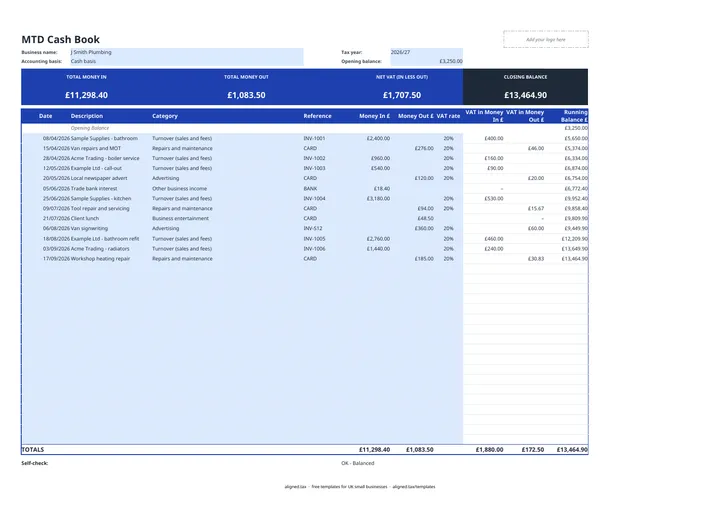
This free cash book template is an Excel workbook for one tax year. You record every payment in or out of the business bank account as shown on your statement, and the sheet keeps a running balance, works out the VAT inside each amount and totals everything by HMRC category. Those year-to-date totals feed each MTD quarterly update.
What does the workbook include?
There are two working tabs.
- Cash Book: one row per transaction with Date, Description, Category, Reference, Money In £, Money Out £, a VAT rate, the VAT in each amount, and a Running Balance £. Tiles at the top show total money in, total money out, net VAT (VAT in money in less VAT in money out) and the closing balance.
- Categories: each category, where it goes on your tax return, and your money in and out so far this tax year. A check compares these totals with the Cash Book. The VAT rates used by the dropdown sit at the bottom.
The category list follows HMRC’s self-employment headings, such as “Cost of goods bought for resale or used”, “Car, van and travel expenses” and “Accountancy, legal and professional fees”. It also has lines for property income and expenses, equipment, buying a car, land and buildings, drawings and money paid in by the owner. Drawings are kept apart because they are not a business expense.
Equipment follows the accounting basis you choose. Under the cash basis, equipment, tools and machinery are allowable expenses when you pay for them, so the Categories tab sends them to other expenses. Under traditional accounting they are claimed as capital allowances. Cars always go to capital allowances. Land, buildings and other capital items that HMRC excludes from the cash basis (BIM72035) are never an expense, so they have their own category, “Land, buildings and other capital (not an expense)”, which keeps them out of your expense totals.
How does it fit with Making Tax Digital?
Under Making Tax Digital for Income Tax, quarterly updates are cumulative. Each one covers 6 April to the end of the quarter, so the four standard updates run to 5 July, 5 October, 5 January and 5 April. Because the Categories tab totals the tax year so far, the figures on it are the ones to send at each quarter end.
MTD applies from April 2026 if your qualifying income from self-employment and property is over £50,000, and from April 2027 if it is over £30,000. The threshold is due to fall to £20,000 from April 2028. The MTD key dates page lists every deadline.
If you keep your records in this workbook, you can upload it to aligned.tax as an .xlsx file and send the quarterly update from there. If you work in Google Sheets, download the file as .xlsx first.
Tips for keeping it accurate
- Start from a real balance. Use the actual bank balance on 6 April, or the running balance will never match your statement.
- Keep business and personal apart. Only business transactions belong here. Money you take out for yourself goes under drawings.
- Reconcile monthly. Compare the closing balance with your bank statement. A difference usually means a missed or duplicated row.
- Use a fresh copy each tax year. The workbook covers one tax year, which keeps each set of cumulative totals clean.