Next Making Tax Digital quarterly update deadline: 7 November 2026.Start filing now

How to fill it in

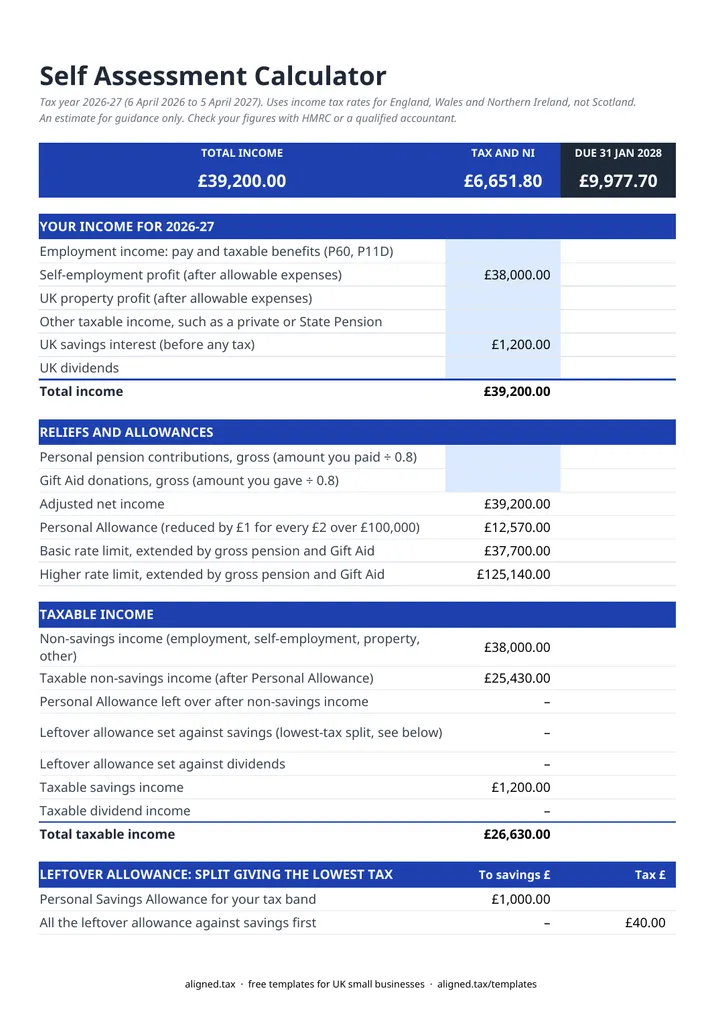
  1. On the SA Calculator tab, enter your 2026-27 income in the blue cells: employment income, self-employment profit, UK property profit, other taxable income such as a pension, UK savings interest and UK dividends.

  2. Enter personal pension contributions and Gift Aid donations as gross amounts: what you paid divided by 0.8.

  3. Say whether you were over State Pension age on 6 April 2026. If you choose Yes, no Class 4 or Class 2 is added. Then choose whether to pay voluntary Class 2 National Insurance. This only applies if your profits are under £7,105, including a profit of £0. Enter the weeks you are paying for: 52 for a full year, or fewer if you reached State Pension age, or started or stopped trading, during 2026-27.

  4. Enter the tax already taken off your pay or pension (from your P60s) and any payments on account you have already made for 2026-27.

  5. Read the results: income tax band by band, Class 4 National Insurance, the balancing payment due 31 January 2028, and whether you need payments on account for 2027-28.

  6. Check the Self-check line, which confirms all your taxable income has been placed in a tax band and the band-by-band tax matches the allowance split used. Every rate used is listed on the Rates 2026-27 tab with its gov.uk source.

This free Self Assessment tax calculator estimates your 2026-27 tax bill in Excel. It covers England, Wales and Northern Ireland only, for the 2026-27 tax year. Enter your income, pension and Gift Aid and tax already deducted, and it works out income tax band by band, Class 4 National Insurance, your balancing payment for 31 January 2028 and any payments on account.

What income does it handle?

The calculator takes employment income, self-employment profit, UK property profit, other taxable income such as a pension, savings interest and dividends. It then applies the reliefs in the right order:

  • the Personal Allowance, reduced by £1 for every £2 of adjusted net income over £100,000, set against non-savings income first, with any left over split between savings and dividends in whichever way gives the lowest tax (the sheet costs each split where a band or allowance edge is reached and shows the one it used)
  • the basic and higher rate limits, extended by gross pension contributions and Gift Aid
  • the starting rate for savings, the Personal Savings Allowance and the Dividend Allowance
  • Class 4 National Insurance on self-employment profit, and optional voluntary Class 2 for the number of weeks you enter, unless you were over State Pension age on 6 April 2026

2026-27 rates used

Item 2026-27
Personal Allowance £12,570
Basic rate band £37,700 at 20%
Higher rate 40%, up to £125,140
Additional rate 45%
Starting rate for savings Up to £5,000 at 0%
Personal Savings Allowance £1,000 basic rate, £500 higher rate, £0 additional rate
Dividend Allowance £500
Dividend rates 10.75%, 35.75%, 39.35%
Class 4 National Insurance 6% from £12,570 to £50,270, 2% above
Class 2 (voluntary) £3.65 a week if profits are under £7,105

Every figure sits on the Rates 2026-27 tab with its gov.uk source, so no rate is hidden inside a formula.

What you pay and when

The balancing payment is your 2026-27 tax and Class 4 National Insurance, less tax already taken off and any payments on account made. It is due by 31 January 2028, together with the first payment on account for 2027-28 if one is needed. The second payment on account is due by 31 July 2028.

This is an estimate for guidance. Check your figures with HMRC or a qualified accountant before relying on them.

Making Tax Digital and your Self Assessment

From 6 April 2026, sole traders and landlords with qualifying income over £50,000 must keep digital records and send quarterly updates under Making Tax Digital for Income Tax. The threshold falls to £30,000 from April 2027 and is due to fall to £20,000 from April 2028. The MTD guide for sole traders explains what changes.
Self Assessment Tax Calculator 2026-27: FAQs

Is this Self Assessment calculator free?

Yes. It is free to download; you just enter your email address to get the Excel file.

Does it work for Scottish taxpayers?

No. It uses the income tax rates for England, Wales and Northern Ireland only. Scotland has different rates and bands for non-savings income, so Scottish taxpayers should not use it.

Which tax year does it cover?

The 2026-27 tax year only, 6 April 2026 to 5 April 2027. The balancing payment for that year is due by 31 January 2028.

When do I need to make payments on account?

Payments on account are two advance payments, each half of your income tax and Class 4 National Insurance less tax taken off at source, due 31 January and 31 July. You do not need them if that amount is under £1,000, or if more than 80% of your tax was taken off at source.

What does the calculator leave out?

It does not include the High Income Child Benefit Charge, student or postgraduate loan repayments, Marriage Allowance, the tax credit for residential mortgage interest, losses, capital gains, foreign income or pension annual allowance charges.

When it is time to file, use aligned.tax

Keeping your records in Excel? Read our guide to Making Tax Digital for sole traders to see how aligned.tax sends your quarterly update to HMRC from an .xlsx file. Free for individuals, see pricing.

Using the Google Sheets copy? Download it as an Excel (.xlsx) file before uploading it to aligned.tax.