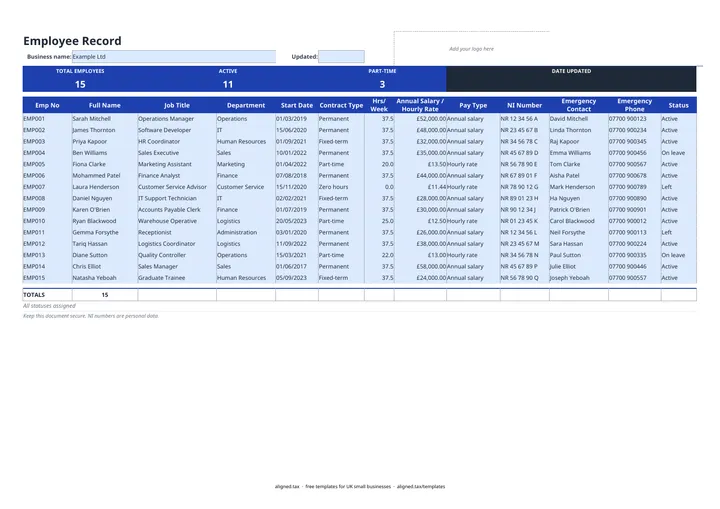
This free employee records template keeps a master list of your staff in one Excel sheet: job title, department, start date, contract type, hours, pay basis, National Insurance number, emergency contact and employment status. Add one row per person, pick from the dropdowns, and the band at the top counts total, active and part-time employees for you.
What goes in each column?
| Column | What to enter |
|---|---|
| Emp No | Your own reference, such as EMP001 |
| Full Name, Job Title, Department | As used on payroll |
| Start Date | dd/mm/yyyy |
| Contract Type | Permanent, Fixed-term, Part-time or Zero hours |
| Hrs/Week | Contracted hours |
| Annual Salary / Hourly Rate and Pay Type | The figure, and whether it is a salary or an hourly rate |
| NI Number | From the employee or their P45 |
| Emergency Contact and Emergency Phone | Who to call and how |
| Status | Active, On leave or Left |
The sheet has room for 15 employees. Because it mixes salaries and hourly rates in one column, it does not total pay.
Why keep a staff list as well as payroll?
Payroll software holds what you pay people, but not always who to call in an emergency, who is on leave, or when someone’s fixed-term contract started. A single list makes it quicker to answer questions about your team and to check that payroll is complete: everyone marked Active should appear on your next pay run.
Keeping personal data safe
NI numbers and emergency contacts are personal data under UK GDPR. Keep the file access-controlled, share it password-protected, and review it regularly so you are not holding details for longer than you need. If you are a sole trader who also employs staff, see what Making Tax Digital for sole traders means for your own records.