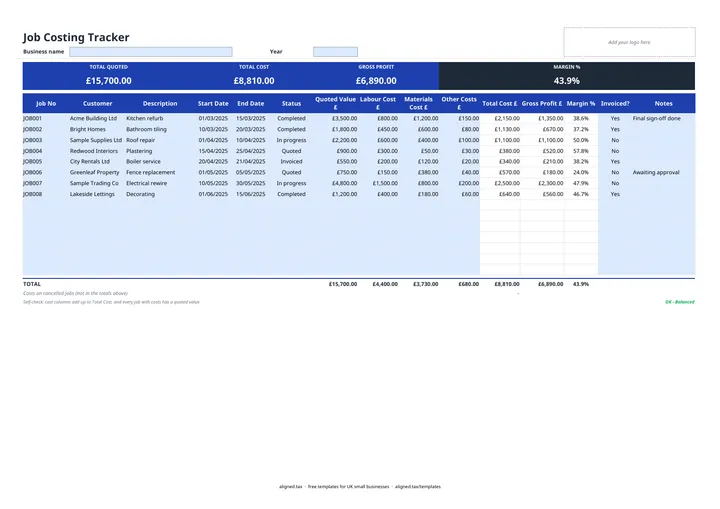
A job costing template shows whether each job actually made money. In this free Excel tracker you enter the price you quoted, then the labour, materials and other costs as they come in. Total cost, gross profit and margin calculate for every job, and the band at the top shows totals and overall margin across all of them.
Why cost every job?
Most trades know their turnover. Fewer know which jobs earn the money. Costing each job against its quote shows:
- Which types of work carry the best margin
- Where labour regularly runs over the estimate
- Whether material prices have crept up since you set your rates
- Which customers are worth chasing for repeat work
If one kind of job keeps coming in at a 10% margin while another makes 35%, that is a pricing decision waiting to be made.
What the columns and checks do
Each row has three cost columns, Labour, Materials and Other, which add up to Total Cost £. Gross Profit £ is the quoted value minus that total, and Margin % is gross profit as a share of the quote. Loss-making jobs show in brackets with the margin in red, and an end date before the start date is also flagged red.
The self-check under the table confirms that the cost columns add up to Total Cost and that every job with costs has a quoted value. If you have started spending on a job before agreeing a price, it tells you.
Jobs marked Cancelled are left out of the totals and the colour band, so Total Quoted shows live work only. Any costs already spent on cancelled jobs appear on their own line under the totals.
From job costs to your tax records
Job costs and quoted values are management figures; your tax return is based on what you actually invoiced and spent. Keep supplier invoices for materials and your sales invoices together, because they are the records behind your accounts. Self-employed in construction or another trade? Making Tax Digital for sole traders explains when you will need to send those figures to HMRC every quarter.