Next Making Tax Digital quarterly update deadline: 7 November 2026.Start filing now

How to fill it in

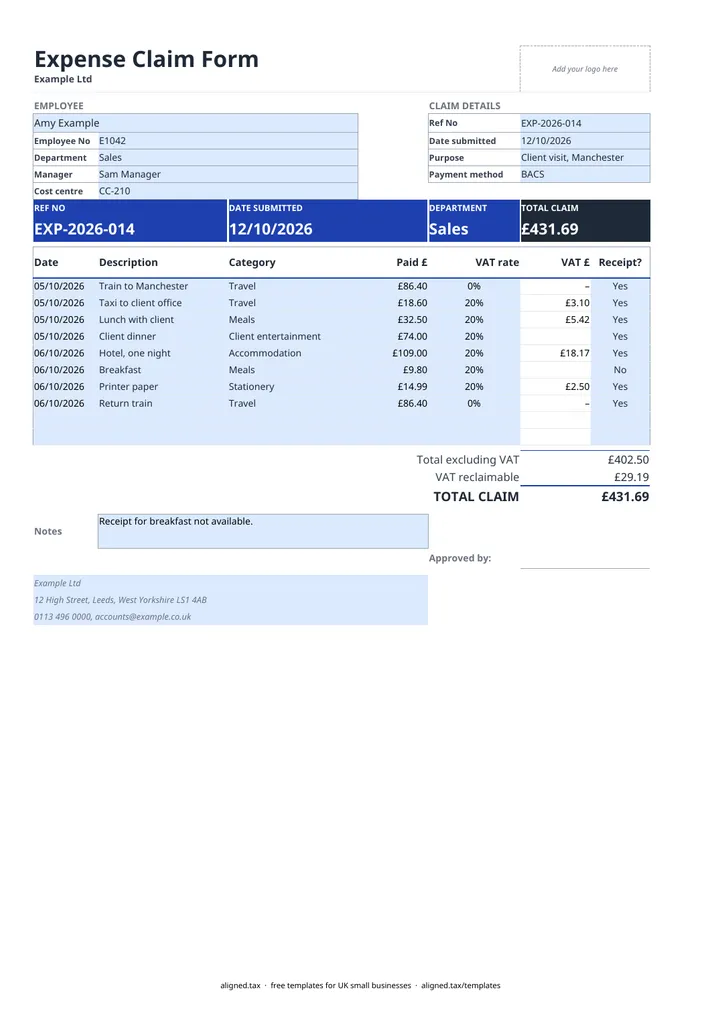
  1. On the Expenses sheet, fill in the EMPLOYEE section: name, Employee No, Department, Manager and Cost centre.

  2. Under CLAIM DETAILS, enter the Ref No, Date submitted and Purpose, and pick the Payment method (BACS, Faster Payment, cheque or with salary).

  3. Add one line per expense, up to 10, with the Date, a Description and a Category such as Travel, Accommodation, Meals, Client entertainment or Staff entertainment.

  4. Under Paid £, enter the amount on the receipt including any VAT, then pick the VAT rate shown on the receipt (20%, 5% or 0%). Leave it blank if the receipt shows no VAT.

  5. Mark Receipt? as Yes or No. VAT is only counted where it says Yes, and never on client entertainment. A blank Receipt? counts as no receipt and turns amber so you can fill it in.

  6. Check Total excluding VAT, VAT reclaimable and TOTAL CLAIM, then have the claim signed in the Approved by box before it is paid.

An expense claim form lets an employee get back money they spent on behalf of the business. In this free UK Excel template, staff enter each receipt with its date, category and amount paid. The form pays back the receipt total, works out the VAT inside each receipt for the employer to reclaim, and has a manager approval box.

How the VAT is worked out

Each line asks for the amount paid, exactly as on the receipt, and the VAT rate printed on it. The VAT is extracted from that amount rather than added on top:

Receipt Paid £ VAT rate VAT £ the business can reclaim
Hotel, one night 120.00 20% 20.00
Train ticket 87.50 0% 0.00
Printer ink 24.99 20% 4.17
Client dinner 60.00 20% 0.00 (client entertainment)
Taxi, no receipt 18.50 0.00

The TOTAL CLAIM is what the employee is paid back. VAT reclaimable is the figure a VAT-registered business can include on its VAT return. If the business is not VAT-registered, leave the VAT rate blank on every line.

Which expense categories does it cover?

The Category list covers Travel, Accommodation, Meals, Client entertainment, Staff entertainment, Stationery and Other. Client and staff entertainment are kept apart because the VAT rules treat them differently: HMRC does not allow VAT to be reclaimed on entertaining clients.

The form does not include a mileage line. If you pay mileage allowance, record it separately at your agreed rate.

Running expenses in a small business

Set a simple rule for staff: one claim per month, receipts attached, approved by a manager before payment. The Payment method cell records whether the claim is paid by bank transfer, cheque or with salary. If you are a sole trader paying your own business costs rather than an employee’s, Making Tax Digital for sole traders explains how those costs are recorded for HMRC.
Expense claim form template UK with VAT: FAQs

Is this expense claim form free?

Yes. It is free to download; you just enter your email address to get the Excel file.

Why does the form take VAT out of the receipt instead of adding it?

Receipts already include VAT, so the employee is paid back the full amount on the receipt. The form works out the VAT inside that amount, for example £20.00 in a £120.00 hotel bill at 20%, so a VAT-registered employer can reclaim it.

Can a business reclaim VAT on client entertainment?

No. HMRC blocks VAT recovery on business entertainment of clients, so the form never counts VAT on lines marked Client entertainment. Staff entertainment is listed separately because VAT on it is generally recoverable.

Do employees need receipts for expense claims?

Employers should ask for them. Without a VAT receipt the business cannot reclaim the VAT, which is why the form only counts VAT on lines where Receipt? is Yes. A blank answer is treated as no receipt.

When it is time to file, use aligned.tax

Keeping your records in Excel? Read our guide to free MTD spreadsheet templates to see how aligned.tax sends your quarterly update to HMRC from an .xlsx file. Free for individuals, see pricing.

Using the Google Sheets copy? Download it as an Excel (.xlsx) file before uploading it to aligned.tax.