Next Making Tax Digital quarterly update deadline: 7 November 2026.Start filing now

How to fill it in

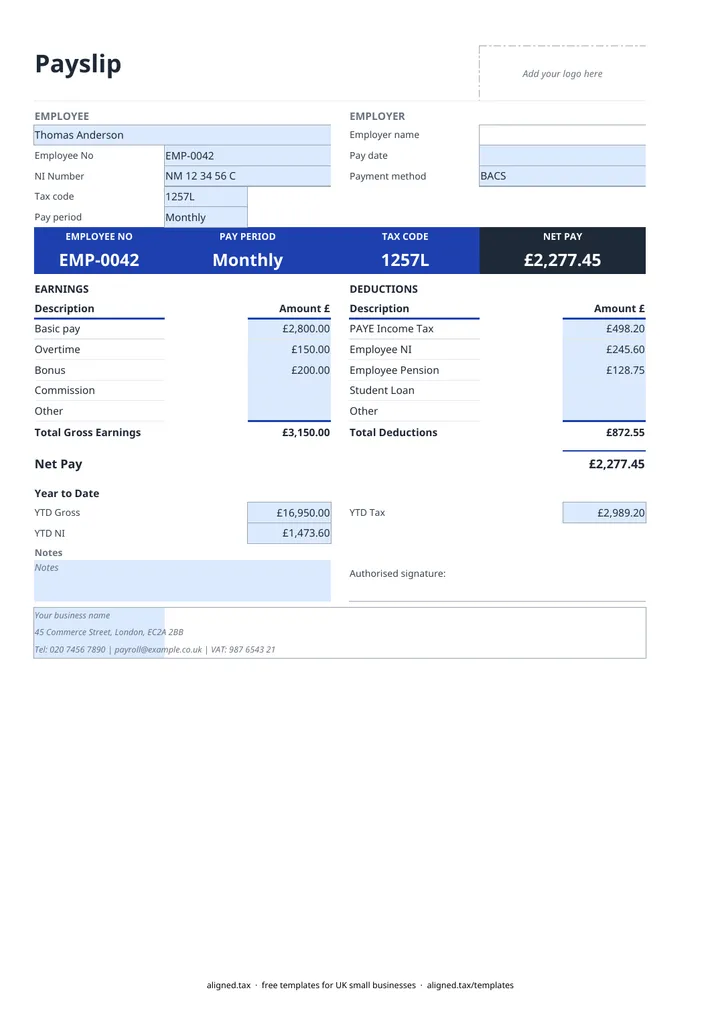
  1. Type your business name and contact details in the blue footer cells at the bottom of the Payslip sheet. Employer name on the card fills in from them.

  2. Fill in the EMPLOYEE section: name, Employee No, NI Number, Tax code and Pay period (Weekly or Monthly).

  3. Enter the Pay date as dd/mm/yyyy and choose the Payment method: BACS, Cheque or Cash.

  4. Under EARNINGS, enter Basic pay and any Overtime, Bonus, Commission or Other amounts. Total Gross Earnings adds them up.

  5. Under DEDUCTIONS, copy PAYE Income Tax, Employee NI, Employee Pension, Student Loan and Other from your payroll software. Total Deductions and Net Pay calculate automatically.

  6. Fill in Year to Date (YTD Gross, YTD Tax and YTD NI) from your payroll records, add hours in Notes if pay varies with time worked, then save a copy for this pay date.

This free UK payslip template gives small employers a clean, printable payslip in Excel. You enter the employee’s details, earnings and deductions from your payroll records, and the sheet totals gross earnings, deductions and net pay, with year-to-date figures underneath. It suits employers with a handful of staff who run payroll software but want a clearer payslip to hand out.

What must a UK payslip show?

Under GOV.UK guidance, a payslip has to show:

  • pay before any deductions (gross pay)
  • each deduction and what it is for, such as tax, National Insurance or pension
  • pay after deductions (net pay)
  • the amount paid by each method, if pay is split
  • the hours worked, if pay varies with time worked

The template covers all of these. Hours go in the Notes box, because most salaried staff do not need them.

What the template does and does not do

The sheet adds up the five earnings lines and five deduction lines, and works out net pay. It keeps the summary card at the top in step with the figures below it, and shows any negative amounts in brackets. It does not calculate PAYE or NI. Your payroll software works those out and reports them to HMRC through RTI, and the payslip simply records them.

A payslip holds personal data, including the NI number and pay. Store saved copies securely and share each one only with the employee it belongs to.

Pay staff and earn from self-employment too?

If you are a sole trader with employees, your own profits are taxed through Self Assessment rather than PAYE. Read how Making Tax Digital for sole traders affects the records you keep.
Free UK payslip template for small employers: FAQs

Is this template free?

Yes. The payslip template is free to download; you just enter your email address to get the Excel file.

Do UK employers have to give employees a payslip?

Yes. Employees and workers are entitled to a payslip on or before payday, showing pay before and after deductions, the deductions themselves, and the net amount for each payment method. If pay varies with the hours worked, the payslip must also show the hours.

Does the template calculate tax and National Insurance?

No. It adds up the figures you enter but does not work out PAYE income tax or NI. Take those from your payroll software, which also has to report them to HMRC. For a quick estimate you can use the PAYE calculator in this library.

Can I use it for weekly and monthly pay?

Yes. Choose Weekly or Monthly in Pay period. Save a separate copy for each payslip so every one keeps its own pay date and figures.

When it is time to file, use aligned.tax

Keeping your records in Excel? Read our guide to free MTD spreadsheet templates to see how aligned.tax sends your quarterly update to HMRC from an .xlsx file. Free for individuals, see pricing.

Using the Google Sheets copy? Download it as an Excel (.xlsx) file before uploading it to aligned.tax.