Next Making Tax Digital quarterly update deadline: 7 November 2026.Start filing now

How to fill it in

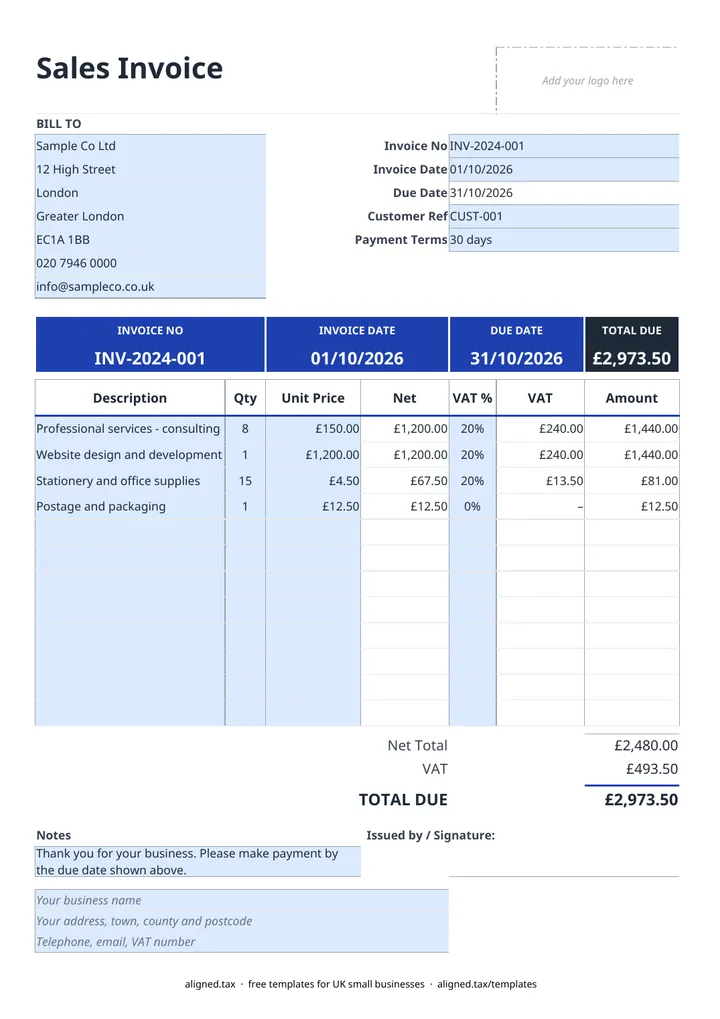
  1. Open the Sales Invoice sheet and type your business name, address and contact details into the three blue footer lines. Add your VAT number on the third line if you are VAT-registered.

  2. Fill in the BILL TO card with your customer's name and address.

  3. Enter the Invoice No, Invoice Date and, if the customer gave you one, a Customer Ref. Pick Payment Terms from the list (cash on delivery, or 7, 14, 30, 60 or 90 days) and the Due Date fills in.

  4. Add up to 12 line items with a Description, Qty and Unit Price. Net, VAT and Amount calculate on each line.

  5. Choose 20%, 5% or 0% in the VAT % column for each line. If you are not VAT-registered, leave VAT % blank, because 0% means a zero-rated supply.

  6. Check Net Total, VAT and TOTAL DUE, add a note or signature if you want one, then save a copy under the invoice number before sending.

This free UK invoice template is an Excel sales invoice that does the arithmetic for you. Type your customer, invoice number, date and items into the blue cells. VAT is worked out line by line at 20%, 5% or 0%, the due date follows the payment terms you pick, and the TOTAL DUE updates as you go.

What should a UK invoice include?

The legal minimum is short, and the template has a cell for every item:

Field on the invoice Where it goes in the template
Unique, sequential invoice number Invoice No
Date of issue Invoice Date
Your name or trading name, address and contact details Footer lines at the bottom
Customer name and address BILL TO card
What you supplied, how many and at what price Description, Qty, Unit Price
VAT rate and VAT amount (VAT-registered only) VAT % and VAT columns
Total owed and when it is due TOTAL DUE and Due Date

If you are VAT-registered, your VAT registration number must also appear. The third footer line is there for it.

How does the VAT work on each line?

Each line has its own VAT % cell, so you can mix standard-rated (20%), reduced-rate (5%) and zero-rated (0%) items on one invoice. The VAT on every line is rounded to the penny before it is added up, so the VAT total matches what your customer sees line by line.

If you are not VAT-registered, leave VAT % blank rather than choosing 0%. A blank cell means no VAT applies; 0% means a zero-rated supply, which only a VAT-registered business can make. Negative lines, such as a discount, show in brackets.

Numbering and keeping copies

HMRC does not set a format for invoice numbers, but each one must be unique and follow on from the last. A simple run such as INV-001, INV-002 works, or a yearly prefix such as 2026-001. Save each invoice as its own file under its number so you never overwrite a sent invoice.

Your sales invoices are also the evidence behind the income in your records. If you are a sole trader and Making Tax Digital for Income Tax applies to you, those records feed your quarterly updates; Making Tax Digital for sole traders explains who is in scope and when.
Free invoice template UK with VAT: FAQs

Is this invoice template free?

Yes. The template is free to download; you just enter your email address to get the Excel file.

What does a UK invoice legally need to show?

A unique invoice number, the invoice date, your name or business name and address, the customer's name and address, a description of what you supplied, the amount charged and the total owed. A VAT-registered business must also show its VAT number, the VAT rate on each item and the VAT amount.

Can I use this invoice template if I am not VAT-registered?

Yes. Leave the VAT % column blank on every line and the VAT total stays empty. Do not pick 0%, because that tells your customer the supply is zero-rated.

When is an invoice due if I have not agreed payment terms?

Under UK late payment rules, a business customer must pay within 30 days of receiving the invoice or the goods if no payment date was agreed. Setting Payment Terms on the invoice makes the due date clear from the start.

When it is time to file, use aligned.tax

Keeping your records in Excel? Read our guide to free MTD spreadsheet templates to see how aligned.tax sends your quarterly update to HMRC from an .xlsx file. Free for individuals, see pricing.

Using the Google Sheets copy? Download it as an Excel (.xlsx) file before uploading it to aligned.tax.