Next Making Tax Digital quarterly update deadline: 7 November 2026.Start filing now

How to fill it in

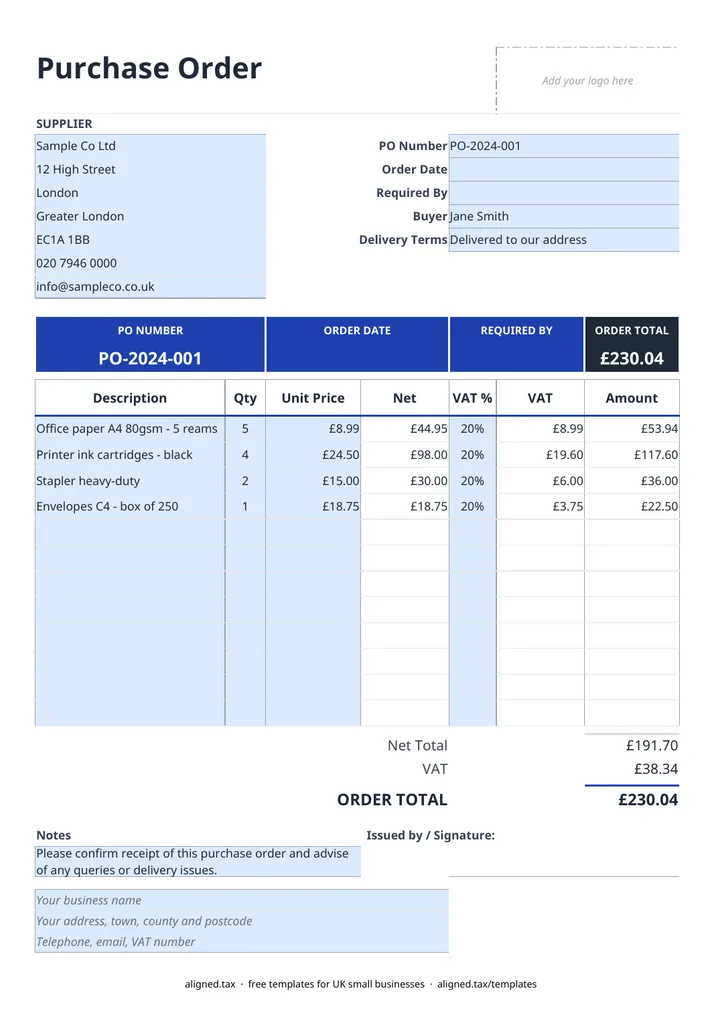
  1. On the Purchase Order sheet, type your business name, address and contact details into the blue footer lines.

  2. Fill in the SUPPLIER card with the supplier's name and address.

  3. Enter the PO Number, Order Date, the Required By date and the Buyer placing the order.

  4. Pick the Delivery Terms: delivered to your address, collected by you, or an Incoterm (EXW, FCA, DAP or DDP) for imports.

  5. List up to 12 items with a Description, Qty and Unit Price, and choose the VAT rate the supplier will charge (20%, 5% or 0%). Leave VAT % blank if the supplier is not VAT-registered.

  6. Check the ORDER TOTAL, then save a copy under the PO number and send it to the supplier.

A purchase order template gives you a written record of what you have asked a supplier for before any money changes hands. In this UK Excel template, add the supplier, the items and the date you need them, choose the VAT rate the supplier will charge and the delivery terms, and the net, VAT and order total calculate automatically.

When should a small business use purchase orders?

You do not legally need a purchase order, but it helps whenever more than one person buys for the business, an order is large, or goods are coming from abroad. Matching the supplier’s invoice to your PO before you pay catches wrong prices, short deliveries and duplicate bills.

The VAT column lets you predict what the supplier’s invoice will show. If they are not VAT-registered, leave VAT % blank and the order total is simply the net amount.

Which delivery terms should I pick?

For UK orders, most buyers choose “Delivered to our address” or “Collected by us”. If you buy from overseas, the Delivery Terms list includes four common Incoterms, which say who arranges transport and who pays import costs:

Term What it means for you as the buyer
EXW (Ex Works) You collect from the supplier’s premises and handle everything from there
FCA (Free Carrier) The supplier hands the goods to your carrier at an agreed place
DAP (Delivered at Place) The supplier delivers to you; you pay import duty and VAT
DDP (Delivered Duty Paid) The supplier delivers and pays the import duty and VAT

Keeping your purchase records together

Save each PO under its number alongside the supplier’s invoice and delivery note. Those documents back up the costs in your bookkeeping. If you are self-employed, see Making Tax Digital for sole traders for how your expense records will feed quarterly updates to HMRC.
Free purchase order template UK: FAQs

Is this purchase order template free?

Yes. It is free to download; you just enter your email address to get the Excel file.

What is a purchase order used for?

A purchase order is the document a buyer sends to a supplier to confirm what they want, at what price and by when. Once the supplier accepts it, it forms the basis of the agreement, and you can check their invoice against it.

What is the difference between a purchase order and an invoice?

The buyer issues a purchase order before the goods are supplied. The supplier issues an invoice afterwards to ask for payment. Quoting your PO number on the invoice makes the two easy to match.

How should I number purchase orders?

Use a simple sequence such as PO-001, PO-002 and never reuse a number. Ask suppliers to quote it on their delivery notes and invoices.

When it is time to file, use aligned.tax

Keeping your records in Excel? Read our guide to free MTD spreadsheet templates to see how aligned.tax sends your quarterly update to HMRC from an .xlsx file. Free for individuals, see pricing.

Using the Google Sheets copy? Download it as an Excel (.xlsx) file before uploading it to aligned.tax.