Next Making Tax Digital quarterly update deadline: 7 November 2026.Start filing now

How to fill it in

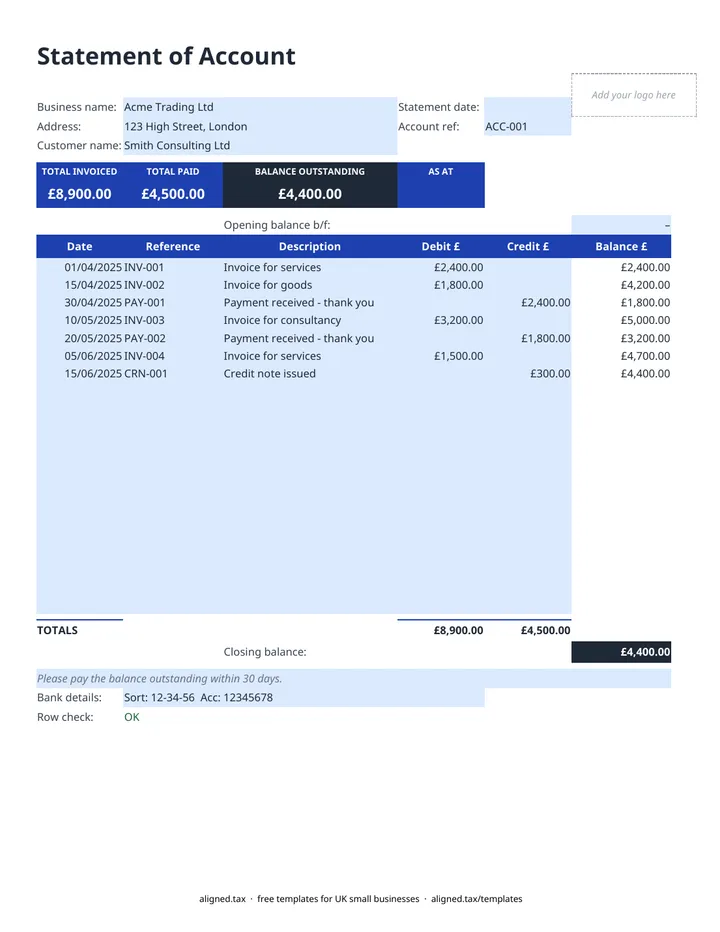
  1. On the Statement of Account sheet, enter your Business name and Address, the Customer name, the Statement date and the Account ref at the top.

  2. Type any balance carried over from the customer's last statement into Opening balance b/f. Leave it blank if this is the first statement.

  3. Add one row per transaction with its Date, Reference and Description. Put invoices under Debit £ and payments or credit notes under Credit £.

  4. Watch the Balance £ column run down the page. TOTAL INVOICED, TOTAL PAID and BALANCE OUTSTANDING update at the top.

  5. Check the Row check under the table. It flags any row missing a date or amount, or with both a debit and a credit, and tints that row red.

  6. Add your bank details, adjust the payment request note if needed, and save a copy for each statement date before sending.

A statement of account shows a customer every invoice, payment and credit note on their account, and the total they still owe. In this free Excel template, enter the opening balance and one line per transaction; the running balance, total invoiced, total paid and balance outstanding calculate automatically, and a row check flags any line that does not add up.

What goes on a customer statement?

A clear statement answers three questions for the customer: what have I been charged, what have I paid, and what do I owe today? The template lays it out like a bank statement:

  • Debit £ for invoices you have issued
  • Credit £ for payments received and credit notes
  • Balance £, a running total worked out from the opening balance plus debits to date, less credits to date
  • AS AT, the statement date shown in the coloured band, so the balance always has a date attached

Because the balance is calculated afresh on every row, a gap or a blank row does not break the running total.

Using statements to get paid faster

Customers often pay from statements rather than individual invoices, especially larger firms with a monthly payment run. Send statements on a fixed date and list the oldest unpaid invoice first in your covering email.

If a business customer pays late, UK law lets you claim statutory interest at 8% above the Bank of England base rate, plus fixed compensation, unless your contract says otherwise. Mentioning this in the notes line is often enough to prompt payment.

Matching statements to your records

The BALANCE OUTSTANDING should match what your own sales records say the customer owes. If it does not, an invoice or payment is missing from one side. Clean sales records matter beyond credit control: they are the income figures behind your tax return, and under Making Tax Digital for sole traders they become the basis of your quarterly updates.
Statement of account template for UK customers: FAQs

Is this statement of account template free?

Yes. It is free to download; you just enter your email address to get the Excel file.

What is a statement of account?

A statement of account is a summary you send a customer showing every invoice, payment and credit on their account over a period, and the balance they still owe. It is a reminder and a reconciliation, not a new invoice.

What is the difference between a statement and an invoice?

An invoice asks for payment for one sale. A statement lists many invoices and payments together and shows the running balance, so the customer can check their records against yours.

How often should I send customer statements?

Monthly is the usual choice for customers who buy on credit. Sending them on the same date each month makes overdue invoices easier to spot and chase.

When it is time to file, use aligned.tax

Keeping your records in Excel? Read our guide to free MTD spreadsheet templates to see how aligned.tax sends your quarterly update to HMRC from an .xlsx file. Free for individuals, see pricing.

Using the Google Sheets copy? Download it as an Excel (.xlsx) file before uploading it to aligned.tax.