Next Making Tax Digital quarterly update deadline: 7 November 2026.Start filing now

How to fill it in

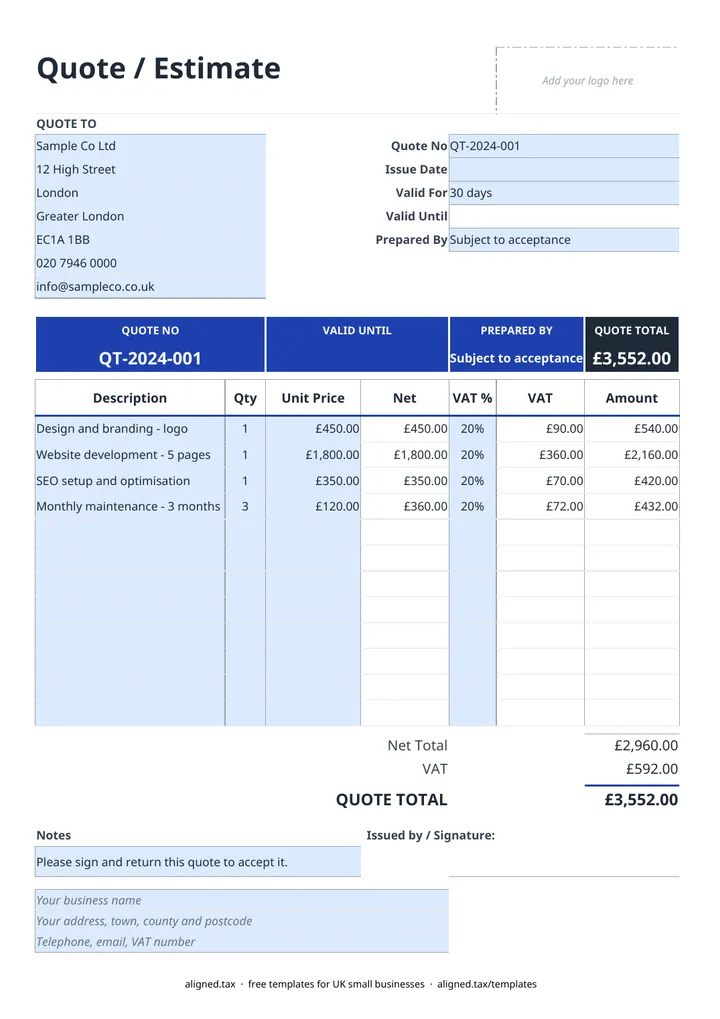
  1. On the Quote sheet, type your business name, address and contact details (with your VAT number if you have one) into the blue footer lines.

  2. Fill in the QUOTE TO card with the customer's name and the site or billing address.

  3. Enter the Quote No and Issue Date, pick Valid For (7, 14, 30, 60 or 90 days) and add your name under Prepared By. The Valid Until date works itself out.

  4. List the work on up to 12 lines, with a Description, Qty and Unit Price for each. Split labour, materials, plant hire and waste removal onto separate lines so the customer can see what they are paying for.

  5. Pick 20%, 5% or 0% in the VAT % column for each line, or leave it blank if you are not VAT-registered.

  6. Check the QUOTE TOTAL, add any payment stages or exclusions in the Notes box, and save a copy under the quote number before you send it.

This free quote template lets UK builders and tradespeople price a job in Excel and send a clear, professional quote. Enter the customer, list labour and materials on separate lines, choose a VAT rate for each line and pick how long the price holds. The net total, VAT, quote total and valid-until date calculate for you.

How to price a building job on one page

Customers compare quotes line by line, so a breakdown wins more work than a single figure. A typical construction quote might use lines like these:

  • Labour, for example “2 operatives, 5 days” with a day rate as the unit price
  • Materials, either itemised or grouped by stage (groundwork, first fix, second fix)
  • Plant or tool hire
  • Skip hire and waste removal
  • Making good and final clean

Put anything you are not doing, such as decorating or building control fees, in the Notes box. A short list of exclusions saves disputes when the job is under way.

Setting VAT and the validity period

Each line has its own VAT % cell (20%, 5% or 0%), so a quote can mix rates where the work allows. If you are not VAT-registered, leave VAT % blank; choosing 0% would describe a zero-rated supply instead. VAT is rounded to the penny on each line before it is totalled.

The Valid For list sets the expiry. Choose 7, 14, 30, 60 or 90 days and the Valid Until date follows from the Issue Date, so you never have to work it out by hand. It also appears in the coloured band at the top of the quote.

From accepted quote to invoice

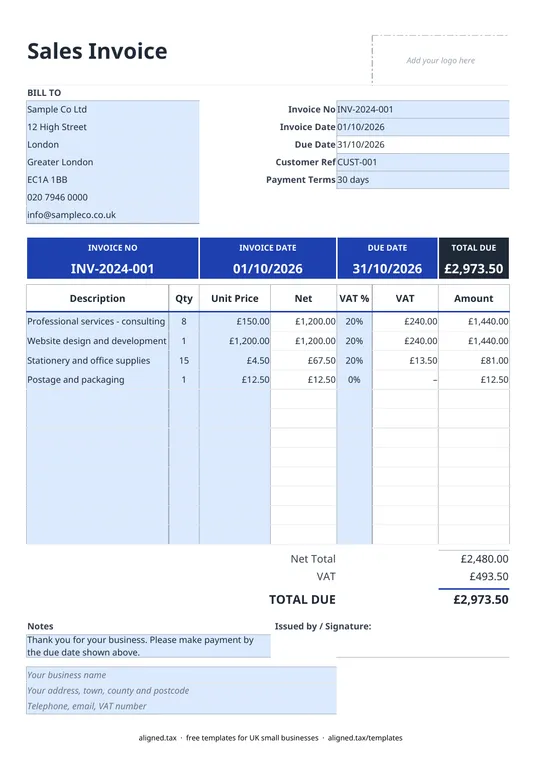
The notes line asks the customer to sign and return the quote to accept it. Once the job is done, the invoice template uses the same layout, so you can copy the lines straight across. If you are self-employed in construction, keep your quotes and invoices with the rest of your business records, which you will need for Making Tax Digital for sole traders once it applies to you.
Quote template UK for builders and trades: FAQs

Is this quote template free?

Yes. The quote template is free to download; you just enter your email address to get the Excel file.

What is the difference between a quote and an estimate?

A quote is a fixed price for the work described, so you are normally held to it if the customer accepts. An estimate is your best guess and can change. Write 'Quote' or 'Estimate' clearly and list what is excluded so there is no argument later.

What should a builder's quote include?

A clear description of the work, the price broken down into labour and materials, whether VAT is included, how long the price is valid, any exclusions, and how and when you want to be paid. This template has a place for each of these.

Do I add VAT to a construction quote?

Only if you are VAT-registered, and at the rate that applies to the work. Some building work is zero-rated or reduced-rate, and work for another VAT-registered contractor under CIS may fall under the domestic reverse charge, so check the rate before you send the quote.

How long should a quote be valid for?

Thirty days is common for building work, but material prices can move quickly, so many trades use 14 days. Pick the period in the Valid For cell and the expiry date appears on the quote.

When it is time to file, use aligned.tax

Keeping your records in Excel? Read our guide to free MTD spreadsheet templates to see how aligned.tax sends your quarterly update to HMRC from an .xlsx file. Free for individuals, see pricing.

Using the Google Sheets copy? Download it as an Excel (.xlsx) file before uploading it to aligned.tax.