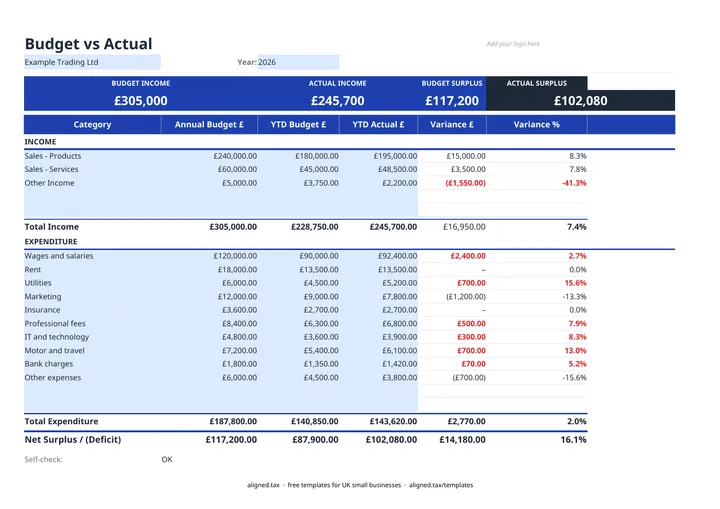
This free budget vs actual template compares what you planned with what really happened. You set an annual budget for each income and spending category, enter the year-to-date budget and actual figures as the year goes on, and the sheet shows the variance in pounds and as a percentage, plus your budgeted and actual surplus.
What the sheet tracks
| Column | What it shows |
|---|---|
| Annual Budget £ | Your plan for the whole year |
| YTD Budget £ | The share of that plan expected by now |
| YTD Actual £ | What has really come in or gone out |
| Variance £ and Variance % | Actual less YTD budget |
Income and expenditure each have their own total, and the Net Surplus / (Deficit) line shows the overall position. The colour band at the top compares budgeted income and surplus with the actual figures.
Setting the year-to-date budget
The simplest method is to divide the annual budget by 12 and multiply by the months gone. That suits steady costs like rent or insurance. For seasonal income or one-off costs, phase the budget to when you expect the money to move, otherwise the variance will look alarming in quiet months for no real reason.
Acting on the variances
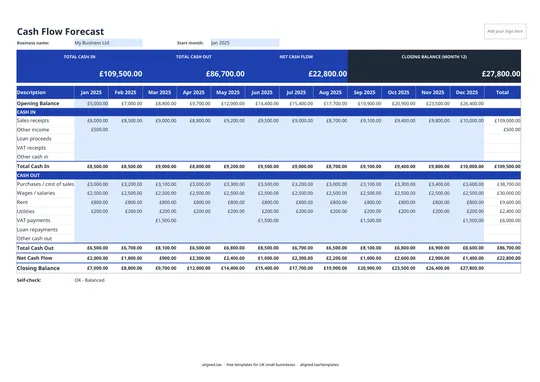
Focus on the large variances, not every line. An overspend may be a timing difference (a bill paid early) or a real problem (costs rising). An income shortfall early in the year can still be recovered, but it is worth checking your cash flow forecast to make sure the bank balance can carry it.