Next Making Tax Digital quarterly update deadline: 7 November 2026.Start filing now

How to fill it in

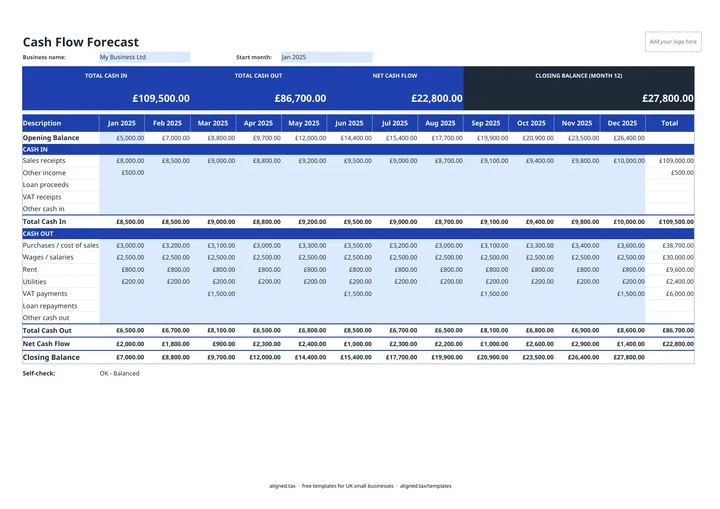
  1. On the Cash Flow Forecast tab, enter your business name and the Start month as a date, for example 01/04/2026. The column headers then show each month.

  2. Enter your Opening Balance: the money in the bank at the start of the first month.

  3. Under CASH IN, enter what you expect to receive each month: sales receipts, other income, loan proceeds, VAT receipts and other cash in.

  4. Under CASH OUT, enter what you expect to pay: purchases / cost of sales, wages, rent, utilities, VAT payments, loan repayments and other cash out. Leave a cell blank if nothing is expected.

  5. Read Net Cash Flow and Closing Balance for each month. Each month opens with the previous month's closing balance, and a negative balance shows in red brackets.

  6. Check the Self-check line. It confirms the month 12 closing balance equals the opening balance plus total cash in less total cash out.

This free cash flow forecast template plans a UK small business’s bank balance for the next 12 months. Enter your opening balance and the cash you expect to receive and pay out each month, and it works out net cash flow and the closing balance for every month, so you can see a shortfall coming before it happens.

What goes into a cash flow forecast?

The forecast has two blocks, each with its own monthly total.

  • Cash in: sales receipts, other income, loan proceeds, VAT receipts and other cash in.
  • Cash out: purchases / cost of sales, wages / salaries, rent, utilities, VAT payments, loan repayments and other cash out.

Net cash flow is cash in less cash out. The closing balance carries forward as the next month’s opening balance. A Total column sums each line for the year, and the tiles at the top show total cash in, total cash out, net cash flow and the month 12 closing balance.

Building a realistic forecast

  1. Start with what you know. Regular costs such as rent, wages, loan repayments and subscriptions.
  2. Add expected income. Use realistic payment timings, not invoice dates. If customers pay on 30-day terms, a March invoice is April cash.
  3. Add the big one-offs. Equipment purchases, insurance renewals, VAT payments and tax bills.
  4. Review monthly. Replace forecasts with actual figures as each month closes, and extend the view as needed.

Do not forget tax payments

Self Assessment balancing payments and payments on account fall due on 31 January and 31 July, and VAT-registered businesses pay VAT after each return. These are some of the largest single payments a small business makes, so put them in the forecast as soon as you know the amounts. The self-assessment tax calculator can help estimate them. For a closer, week-by-week view of the next quarter, use the 13-week cash flow forecast.
Cash Flow Forecast Template UK (12 Months): FAQs

Is this cash flow forecast template free?

Yes. It is free to download; you just enter your email address to get the Excel file.

What is the difference between cash flow and profit?

Profit is income earned less costs incurred, whenever they are paid. Cash flow is money actually arriving in and leaving the bank. A profitable business can still run out of cash if customers pay late or a large bill falls due.

Should I enter amounts when I invoice or when I get paid?

When the money moves. A cash flow forecast tracks the bank balance, so enter receipts in the month the customer pays and payments in the month they leave your account.

What should I do if a month goes negative?

A negative closing balance is a warning to act early: chase debtors, delay a purchase, agree a payment plan or arrange an overdraft before that month arrives.

When it is time to file, use aligned.tax

Keeping your records in Excel? Read our guide to Making Tax Digital for sole traders to see how aligned.tax sends your quarterly update to HMRC from an .xlsx file. Free for individuals, see pricing.

Using the Google Sheets copy? Download it as an Excel (.xlsx) file before uploading it to aligned.tax.