Next Making Tax Digital quarterly update deadline: 7 November 2026.Start filing now

How to fill it in

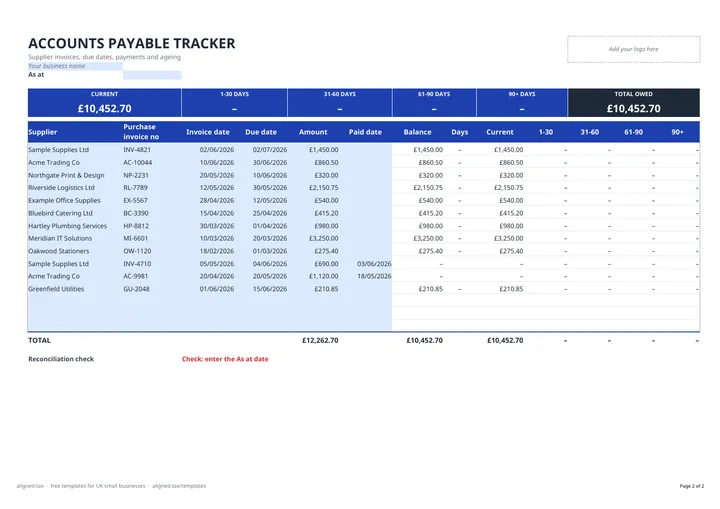
  1. On the AP Tracker tab, replace 'Your business name' with your own, then enter the As at date: today, or a month end. Update it each time you review the list.

  2. For each purchase invoice, fill in the Supplier, Purchase invoice no, Invoice date, Due date and Amount.

  3. When you pay an invoice, enter the Paid date. Its Balance drops to zero.

  4. Balance, Days and the ageing columns (Current, 1-30, 31-60, 61-90, 90+) calculate on their own, measured from the due date to the As at date.

  5. Read the summary strip at the top for what you owe in each age band and the TOTAL OWED. The Reconciliation check confirms the bands add up and flags any invoice without a due date.

This free accounts payable template keeps every unpaid supplier invoice in one list. Enter the supplier, invoice number, invoice date, due date and amount, then the paid date when you settle it. The sheet ages each open invoice against an “As at” date and summarises what you owe as current, 1-30, 31-60, 61-90 and 90+ days overdue.

What the tracker shows

The summary strip across the top is an aged creditors report: the total in each age band and the total owed. Below it, each invoice row shows its balance and how many days overdue it is, and places the balance in the right column. Paid invoices drop to a zero balance, and an invoice with no due date is left out of the ageing and flagged by the reconciliation check rather than silently landing in 90+.

Band Meaning
Current Not yet due
1-30 days Up to a month overdue
31-60 days One to two months overdue
61-90 days Two to three months overdue
90+ days More than three months overdue

Why track supplier invoices?

  • Protect supplier relationships. Paying on time keeps credit terms open and avoids stop notices.
  • Avoid late payment charges. Business suppliers can claim statutory interest and compensation on late commercial payments.
  • Plan cash. Knowing what falls due over the coming weeks feeds straight into a 13-week cash flow forecast.
  • Year-end accounts. The total owed at your year end is the trade creditors figure on your balance sheet.

Keeping the list accurate

Add invoices as they arrive, oldest at the top, and enter the paid date as soon as money leaves the bank. Change the As at date each time you review the list so the ageing is up to date.
Accounts Payable Template with Aged Creditors (UK): FAQs

Is this accounts payable template free?

Yes. It is free to download; you just enter your email address to get the Excel file.

What is accounts payable?

Accounts payable is the money a business owes its suppliers for goods and services bought on credit. In UK accounts it appears as trade creditors on the balance sheet.

What is an aged creditors report?

An aged creditors report groups unpaid supplier invoices by how long they are overdue, for example current, 1-30 days, 31-60 days, 61-90 days and over 90 days. It shows which suppliers need paying first.

How do I record a part payment?

Mark the original invoice as paid, then add a new row for the amount still owed, with the same supplier, invoice number and due date.

When it is time to file, use aligned.tax

Keeping your records in Excel? Read our guide to Making Tax Digital for sole traders to see how aligned.tax sends your quarterly update to HMRC from an .xlsx file. Free for individuals, see pricing.

Using the Google Sheets copy? Download it as an Excel (.xlsx) file before uploading it to aligned.tax.