Next Making Tax Digital quarterly update deadline: 7 November 2026.Start filing now

How to fill it in

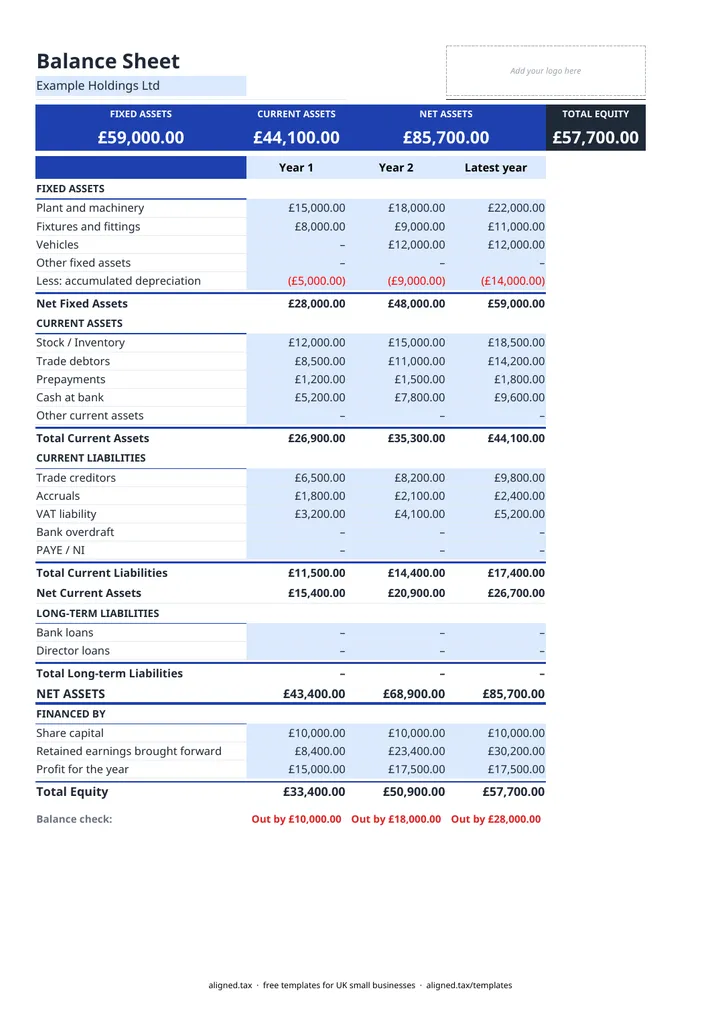
  1. On the Balance Sheet tab, type your business name in the blue cell under the title.

  2. Overtype the year headings (Year 1, Year 2, Latest year) with your accounting periods, oldest on the left. Leave a column blank if you have fewer than three years.

  3. Enter fixed assets at cost, then accumulated depreciation as a positive figure on the 'Less: accumulated depreciation' line.

  4. Enter current assets (stock, trade debtors, prepayments, cash at bank), current liabilities (trade creditors, accruals, VAT, overdraft, PAYE / NI) and long-term liabilities such as bank and director loans.

  5. Under FINANCED BY, enter share capital or capital introduced, retained earnings brought forward and the profit for the year.

  6. Check the Balance check row. It shows Balanced when net assets equal total equity, or 'Out by' and the difference when they do not.

This free balance sheet template sets out a UK small business’s assets, liabilities and equity for up to three years side by side. Enter closing figures from your accounts or trial balance, and it works out net fixed assets, net current assets, net assets and total equity, then confirms each year balances. It suits limited companies and sole traders alike.

What goes on a balance sheet?

The Balance Sheet tab follows the UK format, with net assets on one side and how they are financed on the other.

Section Lines on the template
Fixed assets Plant and machinery, fixtures and fittings, vehicles, other fixed assets, less accumulated depreciation
Current assets Stock / inventory, trade debtors, prepayments, cash at bank, other current assets
Current liabilities Trade creditors, accruals, VAT liability, bank overdraft, PAYE / NI
Long-term liabilities Bank loans, director loans
Financed by Share capital, retained earnings brought forward, profit for the year

Net current assets (current assets less current liabilities) shows whether short-term bills are covered. Net assets is everything owned less everything owed.

Why use three years?

Putting three year ends side by side shows trends a single snapshot hides: debtors growing faster than sales, cash falling while profit rises, or loans creeping up. The colour band at the top always shows the latest year.

Getting it to balance

The most common causes of a mismatch are a liability entered as a negative number, depreciation entered as a negative, or a profit figure that does not match the profit and loss account. Retained earnings should be the figure brought forward from previous years, with this year’s profit on its own line, so it is not counted twice. For the profit figure itself, see the profit and loss template.
Balance Sheet Template UK for Small Businesses: FAQs

Is this balance sheet template free?

Yes. It is free to download; you just enter your email address to get the Excel file.

What does a balance sheet show?

A balance sheet is a snapshot of what a business owns (assets), what it owes (liabilities) and how it is financed (equity) on one date. Net assets must always equal total equity.

Why does my balance sheet say 'Out by'?

A figure is missing or on the wrong line. Enter assets and liabilities as positive numbers, and check that the profit for the year matches your profit and loss account.

Do sole traders need a balance sheet?

HMRC does not ask most sole traders for one, but a balance sheet helps when you apply for finance, take on a partner or want to see how much capital is tied up in the business. For a sole trader, enter capital introduced on the share capital line.

When it is time to file, use aligned.tax

Keeping your records in Excel? Read our guide to Making Tax Digital for sole traders to see how aligned.tax sends your quarterly update to HMRC from an .xlsx file. Free for individuals, see pricing.

Using the Google Sheets copy? Download it as an Excel (.xlsx) file before uploading it to aligned.tax.