Next Making Tax Digital quarterly update deadline: 7 November 2026.Start filing now

How to fill it in

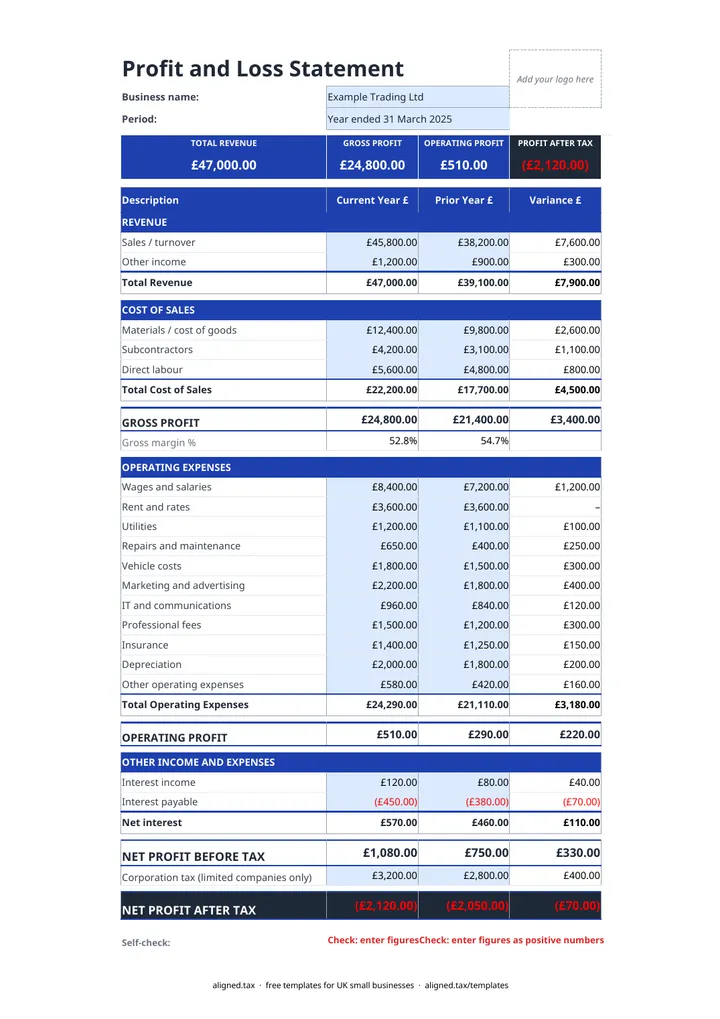
  1. On the P&L Statement sheet, enter your business name and the Period the statement covers, for example Year ended 31 March 2027.

  2. Fill in the Current Year £ column for each line: revenue, cost of sales, operating expenses and interest. Enter every figure as a positive number, including Interest payable.

  3. Add last year's figures in the Prior Year £ column if you have them. The Variance £ column shows the change on every line.

  4. Limited companies enter corporation tax on the 'Corporation tax (limited companies only)' line. Sole traders and partnerships leave it blank.

  5. Check the Self-check line at the bottom. It flags a negative entry or tax charged on a loss.

This free profit and loss template gives a UK small business or limited company a full income statement on one sheet. Enter the year’s revenue, cost of sales, overheads and interest, and it calculates gross profit, gross margin, operating profit, profit before tax and profit after tax, with a prior-year column and a variance on every line.

How is the statement laid out?

The P&L Statement sheet follows the order an accountant would use:

  • Revenue: Sales / turnover and Other income.
  • Cost of sales: Materials / cost of goods, Subcontractors and Direct labour, giving gross profit and gross margin %.
  • Operating expenses: wages and salaries, rent and rates, utilities, repairs, vehicle costs, marketing, IT and communications, professional fees, insurance, depreciation and other costs, giving operating profit.
  • Other income and expenses: Interest income and Interest payable.
  • Tax: a corporation tax line for limited companies, then profit after tax.

The tiles across the top show total revenue, gross profit, operating profit and profit after tax for the current year.

Reading the variance column

Variance is current year less prior year. A rise in revenue is good news; a rise in a cost line is worth a second look. Gross margin % is often the most useful single figure, because it shows whether pricing keeps pace with the cost of what you sell.

Which template should a sole trader use?

This statement uses management-accounts headings, which suit companies and businesses reporting to a bank or investor. If you are a sole trader keeping records for Making Tax Digital for Income Tax, the self-employed profit and loss template uses HMRC’s 15 expense categories instead, so its totals drop straight into your quarterly updates.
Profit and Loss Template UK for Small Businesses: FAQs

Is this profit and loss template free?

Yes. It is free to download; you just enter your email address to get the Excel file.

What is a profit and loss statement?

A profit and loss statement (also called an income statement) shows the income a business earned over a period, the costs of earning it and the profit left over. Lenders, investors and accountants use it to judge how a business is performing.

What is the difference between gross profit and operating profit?

Gross profit is revenue less the direct cost of sales, such as materials, subcontractors and direct labour. Operating profit then takes off overheads like rent, wages, insurance and depreciation.

Is this suitable for a sole trader?

It works for any small business, but sole traders preparing MTD quarterly updates may prefer the self-employed profit and loss template, which follows HMRC's expense categories.

When it is time to file, use aligned.tax

Keeping your records in Excel? Read our guide to Making Tax Digital for sole traders to see how aligned.tax sends your quarterly update to HMRC from an .xlsx file. Free for individuals, see pricing.

Using the Google Sheets copy? Download it as an Excel (.xlsx) file before uploading it to aligned.tax.