Next Making Tax Digital quarterly update deadline: 7 November 2026.Start filing now

How to fill it in

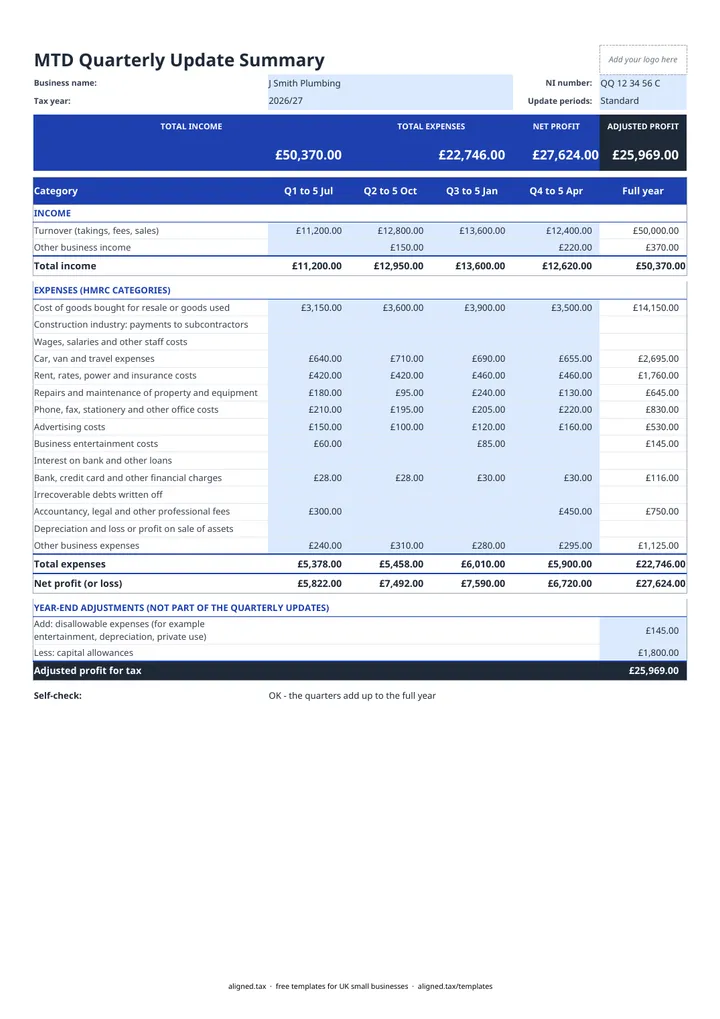
  1. On the MTD Quarterly Update tab, enter your business name and National Insurance number, then pick the tax year (2025/26 to 2028/29). The period dates and deadlines fill in from it.

  2. Leave Update periods on Standard, which runs from 6 April to 5 July and so on. Choose Calendar only if you have opted for calendar update periods.

  3. As each quarter ends, enter that quarter's income (Turnover, Other business income) and expenses in the blue cells, using HMRC's 15 expense categories. Enter only what happened in that quarter.

  4. Open the Cumulative Updates tab. It adds the quarters together and shows, for Update 1 to Update 4, the period start, period end, deadline and the running totals to send.

  5. At the year end, enter disallowable expenses and capital allowances in the Full year column to see your Adjusted profit for tax. These are not part of the quarterly updates.

  6. Check the Self-check line. It confirms the quarters agree with the full-year totals and with the cumulative figures.

This free MTD quarterly update template prepares a sole trader’s figures for Making Tax Digital for Income Tax. Enter each quarter’s income and expenses under HMRC’s categories, and a second tab turns them into the cumulative year-to-date totals that each update needs, with the period dates and deadline for each. It prepares figures; it does not send them to HMRC.

What does each quarterly update need?

From the 2025-26 tax year, every quarterly update is cumulative. Each one covers 6 April to the end of the latest period, so Update 3 contains everything from Update 1 and Update 2 as well. The template works out these running totals for you on the Cumulative Updates tab.

Update Standard period Deadline
1 6 April to 5 July 7 August
2 6 April to 5 October 7 November
3 6 April to 5 January 7 February
4 6 April to 5 April 7 May

If you have chosen calendar update periods, the quarters end on 30 June, 30 September, 31 December and 31 March instead. Set Update periods to Calendar and the dates change; the deadlines do not. See MTD key dates for the full calendar.

Which categories does the template use?

The expense rows match HMRC’s 15 self-employment categories, in the order they appear on the tax return: cost of goods, construction industry payments to subcontractors, wages and staff costs, car, van and travel, rent, rates, power and insurance, repairs and maintenance, phone, fax, stationery and other office costs, advertising, business entertainment, interest on loans, bank and financial charges, irrecoverable debts, professional fees, depreciation, and other business expenses.

Enter every business cost in the right row, even ones that are not allowable for tax such as entertainment or depreciation. You add those back at the year end, along with capital allowances, to reach your adjusted profit.

Who needs to send quarterly updates?

MTD for Income Tax applies to sole traders and landlords with qualifying income (gross self-employment and property income) over £50,000 from 6 April 2026 and over £30,000 from 6 April 2027. The government plans to lower the threshold to £20,000 from 6 April 2028. The qualifying income guide explains how HMRC measures it.

aligned.tax is HMRC-recognised bridging software that sends quarterly updates from your spreadsheet records, and it is free for individuals filing their own MTD for Income Tax quarterly updates. If you prepare your figures in Google Sheets, download the file as .xlsx before uploading it.
MTD Quarterly Update Template for Sole Traders: FAQs

Is this MTD quarterly update template free?

Yes. It is free to download; you just enter your email address to get the Excel file.

Are MTD quarterly updates cumulative?

Yes. From the 2025-26 tax year, each quarterly update covers the tax year to date from 6 April, not just the latest three months. The Cumulative Updates tab gives you those running totals for each update.

When are MTD quarterly updates due?

The deadlines are 7 August, 7 November, 7 February and 7 May, for periods ending 5 July, 5 October, 5 January and 5 April. If you choose calendar periods, the deadlines stay the same.

Which expense categories does HMRC use?

HMRC uses 15 self-employment categories, from 'Cost of goods bought for resale or goods used' to 'Other business expenses'. The template lists all of them in the same order as the self-employment pages of the tax return.

Does this template send my update to HMRC?

No. It prepares your figures. To send a quarterly update you need MTD-compatible software, such as aligned.tax, which can read your records from an .xlsx spreadsheet.

When it is time to file, use aligned.tax

Keeping your records in Excel? Read our guide to Making Tax Digital for sole traders to see how aligned.tax sends your quarterly update to HMRC from an .xlsx file. Free for individuals, see pricing.

Using the Google Sheets copy? Download it as an Excel (.xlsx) file before uploading it to aligned.tax.