Next Making Tax Digital quarterly update deadline: 7 November 2026.Start filing now

How to fill it in

  1. Open the PAYE Calculator sheet and type the gross annual salary into the blue Gross annual salary cell under INPUTS.

  2. Check the Tax code cell. It starts as 1257L; replace it with the code on the payslip, P45 or HMRC coding notice. The Tax code recognised line tells you if the code is not supported, such as an S or K code. Over £100,000, only 1257L is reduced; any other code is used as issued.

  3. Choose the Pay period (Weekly, Fortnightly, Four-weekly, Monthly or Annual) so the per-period figure matches how the employee is paid.

  4. Pick the NI category letter. A covers most employees; the Rates sheet explains B, C, H, J, M, V and Z.

  5. Read the SUMMARY block: gross pay, income tax, employee NI, annual take-home pay and the total employment cost including employer NI.

  6. For a new tax year, update the blue cells on the Rates sheet. Every rate and threshold the calculator uses is held there.

This free Excel take-home pay calculator estimates income tax, employee National Insurance, employer National Insurance and net pay for one salary in the 2026-27 tax year. Type the gross annual salary, check the tax code, pay period and NI category, and the Summary shows annual and per-period take-home pay plus the full cost of employing.

What does the calculator show for a £42,000 salary?

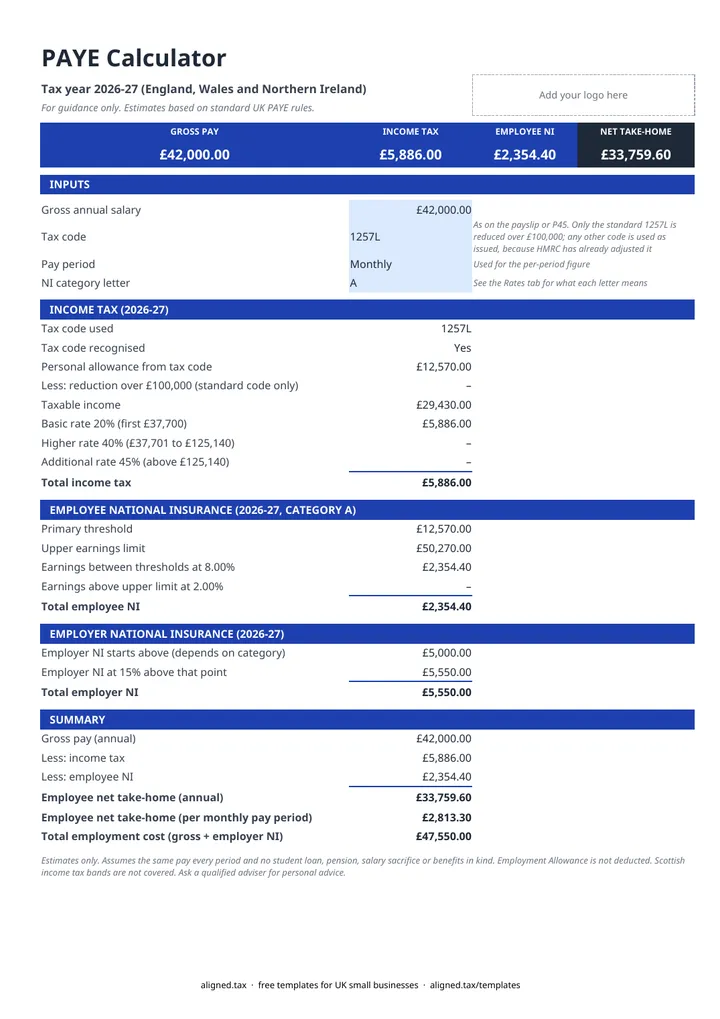
On tax code 1257L, paid monthly, NI category A, the calculator returns:

Line Annual Per month
Gross pay £42,000.00 £3,500.00
Income tax £5,886.00 £490.50
Employee NI £2,354.40 £196.20
Take-home pay £33,759.60 £2,813.30
Employer NI (on top of salary) £5,550.00 £462.50

The tax is 20% of the £29,430 earned above the £12,570 personal allowance. Employee NI is 8% of the same slice, because the salary sits below the £50,270 upper earnings limit. Employer NI is 15% of everything above £5,000, so the total cost of this employee is £47,550 a year.

Which tax codes and NI letters does it understand?

The calculator reads the tax code rather than matching one fixed value. It handles numeric L, M, N and T codes, 0T, BR and NT, the Welsh C prefix and the emergency suffixes W1, M1 and X. Above £100,000 of income it reduces the personal allowance by £1 for every £2, but only on the standard 1257L code. Any other code is used as issued, because HMRC has already built your adjustments into it, so the reduction is not taken twice.

S (Scottish) and K codes are flagged as not supported, and the tax lines stay blank instead of showing a wrong figure. The NI category letter changes both the employee rate and where employer NI starts. For example, category M (under 21) pays no employer NI up to £50,270, and category B uses the reduced 1.85% rate.

What it leaves out

This is an estimate for planning a hire or checking a payslip, not a payroll system. It does not include Scottish rates, student loans, postgraduate loans, pensions, salary sacrifice, benefits in kind or the Employment Allowance. To run payroll and report to HMRC you need RTI payroll software.

Do you also have self-employed income?

PAYE only covers employment income. If you also earn from self-employment or property, those profits go through Self Assessment, and once that qualifying income is over £50,000 you also need to keep digital records and send quarterly updates under Making Tax Digital. Check where you stand with the MTD qualifying income guide.
Take-home pay calculator for Excel (PAYE 2026-27): FAQs

Is this template free?

Yes. The PAYE calculator is free to download; you just enter your email address to get the Excel file.

Which tax year does the calculator use?

It uses 2026-27 rates for England, Wales and Northern Ireland: a £12,570 personal allowance, 20% on the first £37,700 of taxable income, 40% above that and 45% above £125,140, with employee NI at 8% between £12,570 and £50,270 and 2% above. Employer NI is 15% above £5,000.

Does it work for Scottish taxpayers, student loans or pensions?

No. Scottish income tax bands are not covered, and S codes are flagged as not supported rather than guessed. Student loan repayments, pension contributions, salary sacrifice and benefits in kind are not deducted, so a real payslip with any of these will show a lower net figure.

Does it include employer National Insurance?

Yes. Employer NI is worked out at 15% above the £5,000 secondary threshold, or above £50,270 for category H, M, V and Z employees. The Total employment cost line adds it to gross pay. The Employment Allowance is not deducted.

Why might my payslip differ from the calculator?

The calculator gives an annual estimate and assumes the same pay every period. Payroll software works period by period, so irregular pay, a mid-year start, an emergency tax code or any extra deductions will make real payslips differ.

When it is time to file, use aligned.tax

Keeping your records in Excel? Read our guide to free MTD spreadsheet templates to see how aligned.tax sends your quarterly update to HMRC from an .xlsx file. Free for individuals, see pricing.

Using the Google Sheets copy? Download it as an Excel (.xlsx) file before uploading it to aligned.tax.