Next Making Tax Digital quarterly update deadline: 7 November 2026.Start filing now

How to fill it in

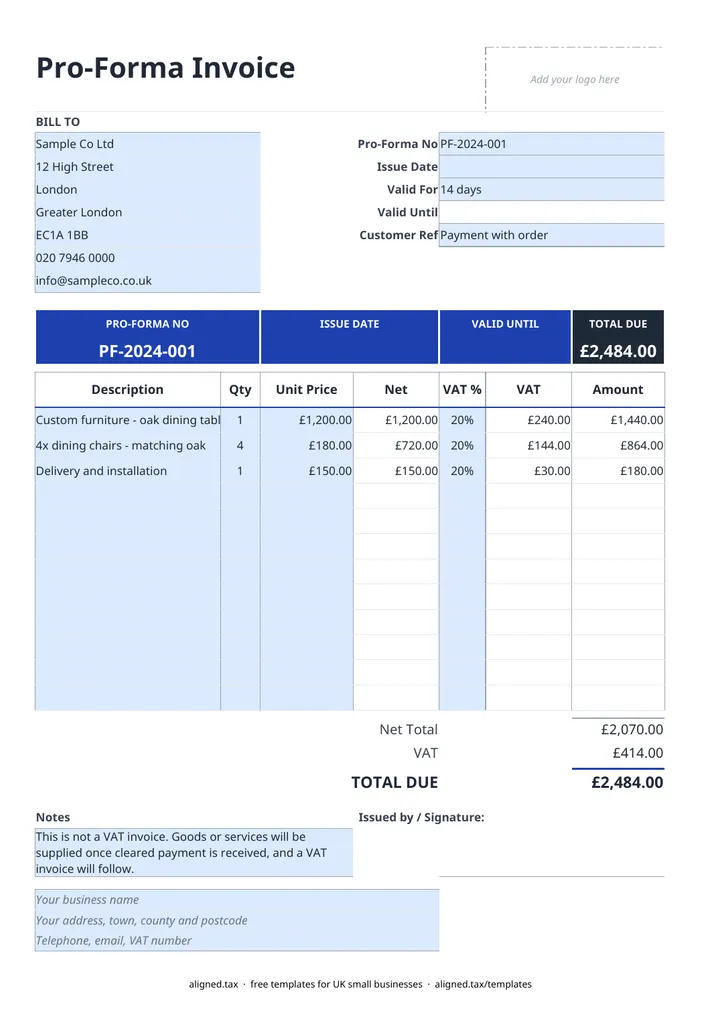
  1. On the Pro-Forma Invoice sheet, type your business name, address and contact details into the blue footer lines.

  2. Fill in the BILL TO card with the customer's name and address.

  3. Enter the Pro-Forma No and Issue Date, choose how long it is Valid For (7, 14, 30, 60 or 90 days) and add any Customer Ref. The Valid Until date fills in.

  4. List up to 12 items with a Description, Qty and Unit Price, and pick 20%, 5% or 0% VAT for each line. Leave VAT % blank if you are not VAT-registered.

  5. Keep the note that begins 'This is not a VAT invoice' and add how you want to be paid.

  6. Check the TOTAL DUE and send it. When the payment clears, supply the goods or services and issue a proper invoice.

A pro forma invoice asks a customer to pay before you supply anything. This free UK template in Excel looks like an invoice and calculates VAT per line, but it carries the wording “This is not a VAT invoice”, as HMRC expects. Set how long the price holds and the valid-until date and total due work themselves out.

How a pro forma invoice works

The usual sequence is:

  1. You send the pro forma with the price, VAT and how to pay.
  2. The customer pays before the Valid Until date.
  3. You supply the goods or carry out the work.
  4. You issue a full VAT invoice for the sale (or a normal invoice if you are not VAT-registered).

Because a pro forma is not a tax document, do not record it as a sale in your books. The sale is recorded from the final invoice.

The VAT rules for pro forma invoices

HMRC’s VAT guide (VAT Notice 700) treats a pro forma as an offer, not a VAT invoice. It cannot support an input tax claim, it should be clearly marked “This is not a VAT invoice”, and it must be followed by a proper VAT invoice once the supply happens. The template’s default note opens with that wording, so leave it in place.

If you are VAT-registered, choose 20%, 5% or 0% on each line to show the customer the VAT they will pay. If you are not, leave VAT % blank.

After the customer pays

Copy the lines into the invoice template, which uses the same layout, and give the invoice its own number from your normal invoice sequence. Keep the pro forma with it so you can see the link between the two.
Pro forma invoice template UK: FAQs

Is this pro forma invoice template free?

Yes. It is free to download; you just enter your email address to get the Excel file.

What is a pro forma invoice?

A pro forma invoice is a request for payment sent before you supply goods or services. It looks like an invoice and shows the price and VAT, but it is not a demand for payment of a completed sale.

Can my customer reclaim VAT on a pro forma invoice?

No. HMRC says a pro forma cannot be used to claim input tax and should be marked 'This is not a VAT invoice'. Your customer reclaims the VAT on the VAT invoice you issue afterwards.

When should I use a pro forma instead of a normal invoice?

Use one when you want payment before you start, such as for a new customer, a large custom order, or goods being shipped abroad. Once you are paid and have supplied the goods, issue a normal invoice.

When it is time to file, use aligned.tax

Keeping your records in Excel? Read our guide to free MTD spreadsheet templates to see how aligned.tax sends your quarterly update to HMRC from an .xlsx file. Free for individuals, see pricing.

Using the Google Sheets copy? Download it as an Excel (.xlsx) file before uploading it to aligned.tax.