Next Making Tax Digital quarterly update deadline: 7 November 2026.Start filing now

How to fill it in

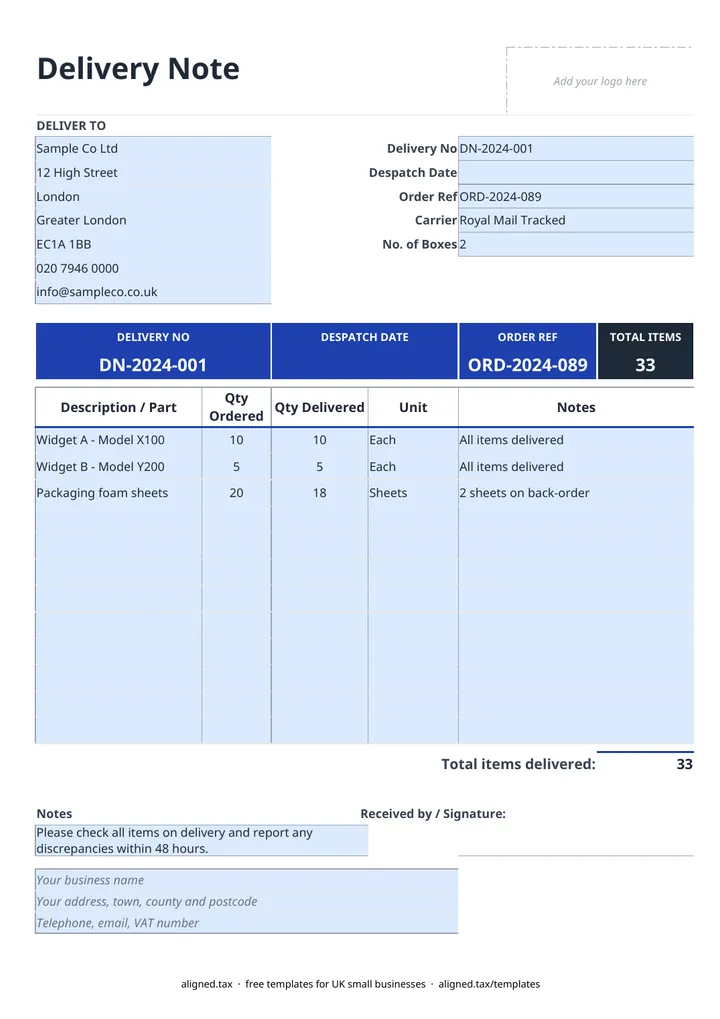
  1. On the Delivery Note sheet, type your business name, address and contact details into the blue footer lines.

  2. Enter the delivery address in the DELIVER TO card.

  3. Fill in the Delivery No, Despatch Date, the customer's Order Ref, the Carrier and the No. of Boxes.

  4. List each item under Description / Part with its Qty Ordered, Qty Delivered and Unit (for example each, box or metre). Use the Notes column for anything back-ordered.

  5. Check that Total items delivered matches what is going on the vehicle, then print two copies: one travels with the goods and one comes back signed.

A delivery note lists the goods in a shipment so the customer can check them and sign for them. This free Excel delivery note template records the order reference, despatch date, carrier and number of boxes, with quantity ordered and quantity delivered side by side. The total counts what was actually delivered, so part deliveries are clear.

Why send a delivery note with every order?

A signed delivery note is your proof that the goods arrived. If a customer later says something was missing or damaged, the signature and the “Received by” line show what was accepted and when. Most disputes are settled by producing it.

The default note asks the customer to report any discrepancies within 48 hours. You can change that period in the Notes box to match your terms of trade.

Delivery note, invoice and purchase order: which is which?

Document Who issues it What it shows
Purchase order The buyer What they want to buy and at what price
Delivery note The seller, with the goods What is in this shipment, with no prices
Invoice The seller What the buyer owes, including any VAT

Quote the customer’s order reference on all three, and checking one against another takes seconds.

Handling part deliveries and back orders

When stock runs short, send what you have and say so. Put the full order under Qty Ordered and the shipped amount under Qty Delivered, then note “Balance to follow” against the line. Raise a second delivery note for the rest, and invoice for what was delivered. Your invoice template uses the same layout, so the lines copy across easily.
Delivery note template for UK businesses: FAQs

Is this delivery note template free?

Yes. It is free to download; you just enter your email address to get the Excel file.

What is a delivery note?

A delivery note is a document that travels with goods and lists what is in the consignment. The customer checks the goods against it and signs to confirm they arrived.

Does a delivery note show prices?

No. A delivery note lists items and quantities only, so it can be opened by anyone handling the goods. Prices and VAT go on the invoice.

How do I show a part delivery?

Enter the full quantity under Qty Ordered and only what is in this shipment under Qty Delivered. The total counts the quantity delivered, so the note shows what actually left your premises.

When it is time to file, use aligned.tax

Keeping your records in Excel? Read our guide to free MTD spreadsheet templates to see how aligned.tax sends your quarterly update to HMRC from an .xlsx file. Free for individuals, see pricing.

Using the Google Sheets copy? Download it as an Excel (.xlsx) file before uploading it to aligned.tax.