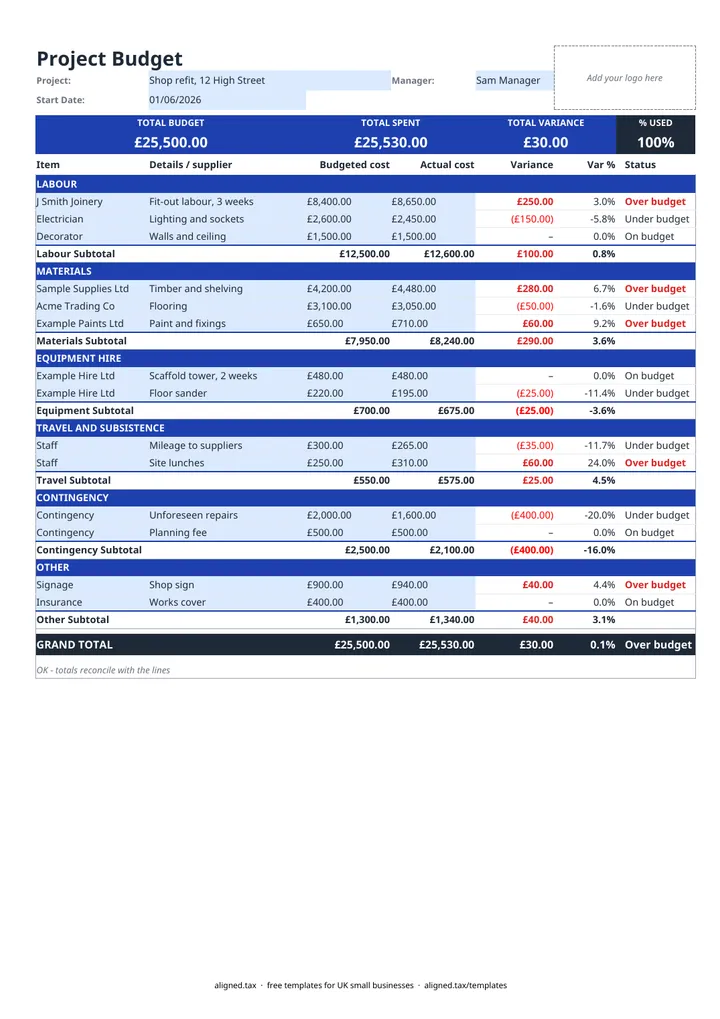
A project budget template sets out what a project should cost and tracks what it really costs. In this free Excel template you enter a budgeted cost for each line under six sections. Add actual spend as invoices arrive, and the variance, percentage and over or under budget status work out for every line, section and the whole project.
How the budget is laid out
Lines are grouped into sections so you can see where the money is going:
- Labour: your own time, staff or subcontractors
- Materials: anything that goes into the finished work
- Equipment hire: plant, tools, scaffolding, skips
- Travel and subsistence: mileage, fuel, parking, meals away
- Contingency: money held back for the unexpected
- Other: fees, permits and anything else
Each section has its own subtotal, and the GRAND TOTAL pulls them together. The band at the top repeats the headline figures: total budget, total spent, total variance and the percentage of the budget used.
Spotting overspends early
Status reads Over budget, On budget or Under budget on every line, with over budget shown in red. Check it whenever you add an actual cost, not just at the end. A materials line running 15% over halfway through tells you to look at prices or quantities while there is still time to act.
The check under the table catches a common mistake: an actual cost entered on a line with no budget. It also confirms the totals reconcile with the lines.
Budgets, quotes and records
If you are pricing work for a customer, build the budget first and set your quote from it with a margin on top. Then track the real costs here as the job runs. The receipts and invoices behind the Actual cost column are also your business records; if you are self-employed, Making Tax Digital for sole traders explains how those costs will be reported to HMRC.