Next Making Tax Digital quarterly update deadline: 7 November 2026.Start filing now

How to fill it in

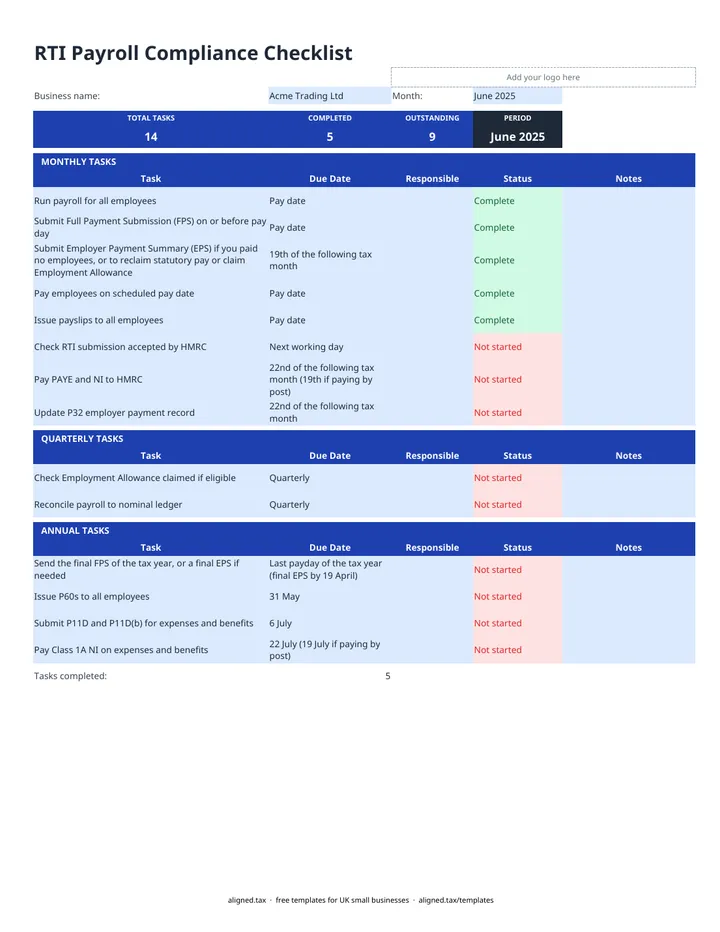
  1. At the top of the RTI Checklist sheet, enter your Business name and choose the Month (April 2026 to March 2027, or type your own).

  2. Put a name against each task in the Responsible column.

  3. Work through the MONTHLY TASKS, setting each Status to Not started, In progress, Complete or N/A.

  4. At each quarter end, complete the QUARTERLY TASKS: check your Employment Allowance claim and reconcile payroll to the nominal ledger.

  5. In April, May and July, work through the ANNUAL TASKS: the final FPS or EPS, P60s, P11D and P11D(b), and Class 1A NI.

  6. Watch the band at the top. It shows TOTAL TASKS, COMPLETED and OUTSTANDING, so you can see what is left before you close the month. Save a copy for each payroll month.

This free RTI payroll checklist lists every Real Time Information task a small employer has to complete each month, quarter and tax year, with the HMRC due date beside each one. Choose the payroll month, assign who does each task, mark progress as you go, and the band at the top counts what is complete and what is still outstanding.

What is on the checklist?

There are 14 tasks in three groups, set up for the 2026-27 tax year:

Group Tasks and due dates
Monthly Run payroll, send the FPS on or before payday, pay staff, issue payslips, check the submission was accepted, send an EPS by the 19th of the following tax month if needed, pay PAYE and NI by the 22nd (19th by post), update the P32 record
Quarterly Check the Employment Allowance claim, reconcile payroll to the nominal ledger
Annual Final FPS or EPS, P60s by 31 May, P11D and P11D(b) by 6 July, Class 1A NI by 22 July (19 July by post)

Every task and due date is editable, so you can add your own steps, such as pension contributions or a sign-off by your accountant.

How does the count work?

TOTAL TASKS counts every task on the sheet. COMPLETED counts those marked Complete, and OUTSTANDING is everything that is neither Complete nor N/A, including tasks you have not started. A task left blank still counts as outstanding, so nothing slips through.

Why do RTI dates matter?

HMRC can charge penalties for late FPS submissions and late PAYE payments, and interest runs on late payments. Working through the same list every month is the simplest way to avoid that. For your own tax, if you also have self-employment or rental income, our MTD key dates page lists the quarterly deadlines that apply under Making Tax Digital.
RTI payroll checklist with HMRC deadlines: FAQs

Is this template free?

Yes. The RTI checklist is free to download; you just enter your email address to get the Excel file.

When is the FPS due?

A Full Payment Submission (FPS) must reach HMRC on or before each payday, every time you pay employees.

When is the EPS due?

An Employer Payment Summary (EPS) is due by the 19th of the following tax month. You send one if you paid no employees in a tax month, or to reclaim statutory pay or claim the Employment Allowance.

When do I pay PAYE and NI to HMRC?

By the 22nd of the following tax month if you pay electronically, or the 19th if you pay by post. A tax month runs from the 6th of one month to the 5th of the next.

What are the payroll year-end deadlines?

Send the final FPS on or before the last payday of the tax year, or a final EPS by 19 April if needed. Give employees their P60 by 31 May, submit P11D and P11D(b) for expenses and benefits by 6 July, and pay Class 1A NI by 22 July (19 July by post).

When it is time to file, use aligned.tax

Keeping your records in Excel? Read our guide to free MTD spreadsheet templates to see how aligned.tax sends your quarterly update to HMRC from an .xlsx file. Free for individuals, see pricing.

Using the Google Sheets copy? Download it as an Excel (.xlsx) file before uploading it to aligned.tax.