Next Making Tax Digital quarterly update deadline: 7 November 2026.Start filing now

How to fill it in

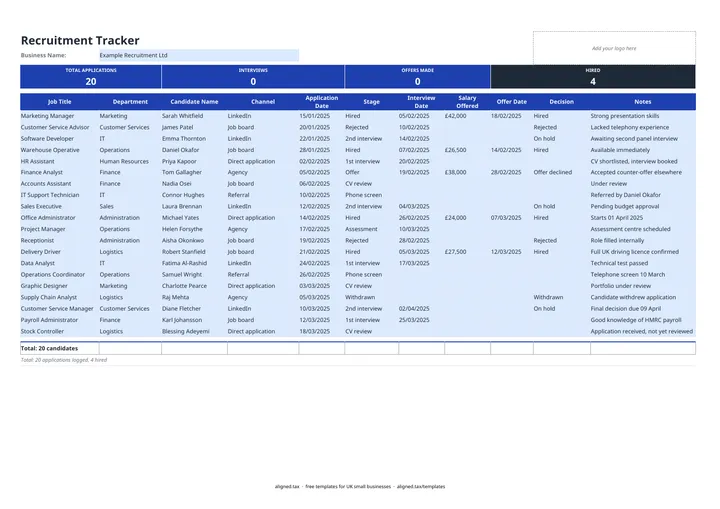
  1. Open the Recruitment Tracker sheet and enter your business name next to Business Name.

  2. Add one row per candidate with the Job Title, Department, Candidate Name and Application Date.

  3. Pick the Channel the application came through: Job board, LinkedIn, Agency, Referral, Direct application or Other.

  4. Move each candidate along with the Stage list, from CV review through Phone screen, interviews and Assessment to Offer or Hired.

  5. Enter the Interview Date when an interview takes place, and the Salary Offered and Offer Date when you make an offer.

  6. Record the final outcome in the Decision column and use Notes for feedback. The band counts applications, interviews, offers and hires as you go.

A recruitment tracker keeps every job applicant in one list, from the day their CV arrives to the final decision. This free Excel template holds up to 20 candidates, with dropdowns for channel, stage and decision. The band at the top counts total applications, interviews held, offers made and hires, so you can see how a hiring round is going.

How the tracker counts progress

The four figures in the band come from what you enter, not from guesswork:

  • TOTAL APPLICATIONS counts every row with a Candidate Name
  • INTERVIEWS counts candidates with an Interview Date entered
  • OFFERS MADE counts candidates with an Offer Date entered
  • HIRED counts candidates whose Decision is Hired

Because interviews and offers are counted from dates, a candidate who reached interview but was later rejected still counts as interviewed.

Seeing which channels work

The Channel column records where each application came from. After a round, filter by channel and compare it with the Decision column. If most of your hires came from referrals and the job board brought nothing usable, that tells you where to spend next time.

Steps to take before a new starter begins

Before anyone starts work, you must check they have the right to work in the UK. Once they join, they become part of your payroll and records, so set up a proper employee file. The employee record template is a good next step.
Recruitment tracker for small UK businesses: FAQs

Is this recruitment tracker free?

Yes. It is free to download; you just enter your email address to get the Excel file.

How many candidates can the tracker hold?

It has 20 candidate rows on one sheet, which suits a small business hiring for one or two roles at a time. Save a new copy for each recruitment round.

Can I filter candidates by job or stage?

Yes. The header row has filters switched on, so you can show only one job title, stage or decision while the sheet stays protected.

How long can I keep unsuccessful candidates' details?

UK GDPR says personal data should not be kept for longer than you need it. Set a retention period for unsuccessful applications, tell candidates what it is, and delete the rows when it ends.

When it is time to file, use aligned.tax

Keeping your records in Excel? Read our guide to free MTD spreadsheet templates to see how aligned.tax sends your quarterly update to HMRC from an .xlsx file. Free for individuals, see pricing.

Using the Google Sheets copy? Download it as an Excel (.xlsx) file before uploading it to aligned.tax.