Next Making Tax Digital quarterly update deadline: 7 November 2026.Start filing now

How to fill it in

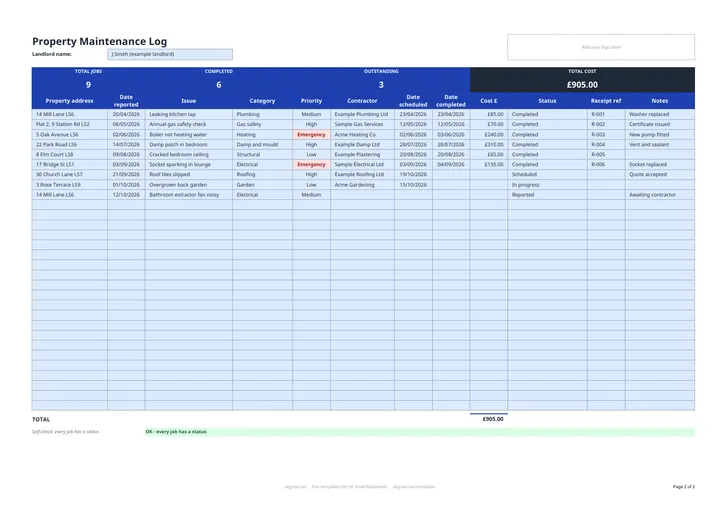
  1. On the Maintenance Log tab, enter your name in Landlord name.

  2. For each job, enter the Property address, Date reported and Issue, and choose a Category such as Plumbing, Heating, Gas safety or Damp and mould.

  3. Set the Priority: Emergency, High, Medium or Low. Emergency jobs are highlighted in red.

  4. Add the Contractor and the Date scheduled when the work is booked, and set Status to Scheduled or In progress.

  5. When the work is done, enter the Date completed and Cost £, add the Receipt ref, and set Status to Completed (or Closed - no fault found).

  6. Check the band for TOTAL JOBS, COMPLETED, OUTSTANDING and TOTAL COST, and the self-check line under the table.

A property maintenance log is a running record of every repair and maintenance job across your rental properties. This free Excel template gives you one row per job: what was reported, when, how urgent it is, who is fixing it, the cost and whether it is done. The band at the top shows total jobs, open jobs and total spend.

What does the log record?

  • Property address, Date reported and Issue
  • Category: Plumbing, Electrical, Heating, Gas safety, Roofing, Damp and mould, Structural, Decoration, Windows and doors, Garden or Other
  • Priority: Emergency, High, Medium or Low, with Emergency shown in red
  • Contractor, Date scheduled and Date completed
  • Cost £ and Receipt ref
  • Status: Reported, Scheduled, In progress, Completed or Closed - no fault found

All dates are real dates in dd/mm/yyyy, so you can sort the log by when a problem was reported or fixed.

Why keep a maintenance log?

A dated log shows when a tenant reported a problem and how quickly you dealt with it, which matters for issues such as damp, mould and gas safety. It also ties each cost to a receipt, so your expenses are easy to back up if HMRC asks.

Using the log for your tax records

The Cost £ column and Receipt ref give you the evidence behind your property repair expenses. If your qualifying income from property and self-employment is over the MTD threshold, those expenses go into your quarterly updates under Making Tax Digital for Income Tax. The MTD guide for landlords explains what changes.
Property maintenance log template for landlords: FAQs

Is this template free?

Yes. The property maintenance log is free to download; you just enter your email address to get the Excel file.

Can I use one log for several properties?

Yes. Each row is one job with its own property address, so you can log work across your whole portfolio and sort or filter by address. The log has 30 rows.

Which jobs count as outstanding?

Jobs with a status of Reported, Scheduled or In progress. Completed jobs and those closed with no fault found are not counted.

Are repair costs allowable against rental income?

Repairs and maintenance that keep a property in its existing condition are usually allowable expenses. Improvements that add something new are usually capital costs and treated differently. Keep the receipt for every job either way.

When it is time to file, use aligned.tax

Keeping your records in Excel? Read our guide to Making Tax Digital for landlords to see how aligned.tax sends your quarterly update to HMRC from an .xlsx file. Free for individuals, see pricing.

Using the Google Sheets copy? Download it as an Excel (.xlsx) file before uploading it to aligned.tax.