Next Making Tax Digital quarterly update deadline: 7 November 2026.Start filing now

How to fill it in

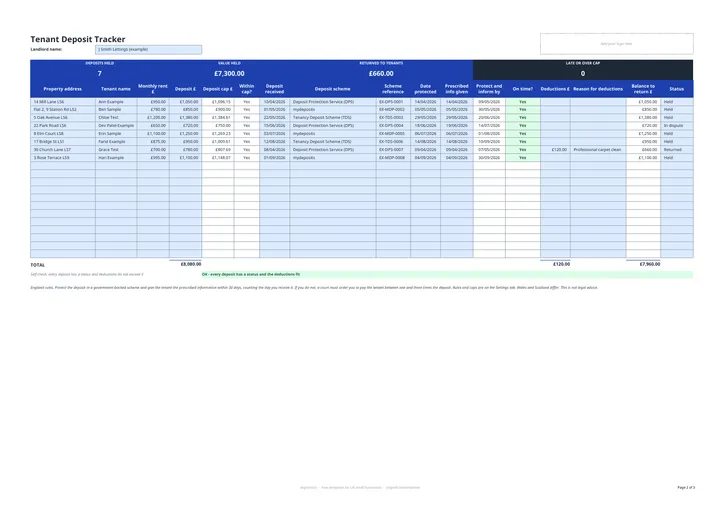
  1. On the Deposit Tracker tab, enter your name in Landlord name.

  2. For each tenancy, enter the Property address, Tenant name, Monthly rent £ and Deposit £. Deposit cap £ and Within cap? fill in.

  3. Enter the Deposit received date. Protect and inform by shows the last day to protect the deposit and give the prescribed information.

  4. Choose the Deposit scheme (DPS, mydeposits or TDS), then enter the Scheme reference, Date protected and Prescribed info given date. On time? shows Yes, Not done yet or LATE.

  5. When the tenancy ends, enter any Deductions £ and the Reason for deductions. Balance to return £ is the deposit less deductions. Set Status to Returned.

  6. Check the band for DEPOSITS HELD, VALUE HELD, RETURNED TO TENANTS and LATE OR OVER CAP, and the self-check line under the table.

This free tenant deposit tracker is a deposit register for landlords in England. For each tenancy it works out the deadline to protect the deposit and give the prescribed information, checks the deposit against the legal cap, and records the scheme, deductions and the balance returned. A status column flags anything late in red, so nothing is missed.

What are the deposit rules in England?

The tracker reflects these rules, checked against GOV.UK and legislation.gov.uk on 14 October 2026:

Rule What it means
Protect within 30 days Including the day you receive it, in DPS, mydeposits or TDS
Give the prescribed information within 30 days Same deadline as protection
Penalty if late Between one and three times the deposit, ordered by a court
Cap below £50,000 annual rent 5 weeks’ rent
Cap from £50,000 to £100,000 annual rent 6 weeks’ rent

Above £100,000 a year the tracker shows Check rather than a cap, because GOV.UK sets none. Every figure sits on the Settings tab in blue cells, so you can update a rule in one place.

How does the deposit cap check work?

The tracker turns monthly rent into weekly rent (monthly rent x 12 / 52), multiplies by 5 or 6 weeks depending on the annual rent, and rounds only that final cap down to the penny. At £1,000 a month, for example, the 5-week cap is £1,153.84. Within cap? shows whether the deposit you took is at or below that figure, so a deposit even 1p over the cap shows as over.

Deposits and your rental income

A deposit is the tenant’s money, not your rental income, until you keep some of it. Deductions you keep, for example for damage, may need to go into your property accounts. If your qualifying income is over the threshold, those accounts feed your Making Tax Digital quarterly updates: see the MTD guide for landlords.
Tenant deposit tracker for landlords in England: FAQs

Is this template free?

Yes. The tenant deposit tracker is free to download; you just enter your email address to get the Excel file.

How long do I have to protect a tenancy deposit in England?

30 days, counting the day you receive the deposit, to protect it in a government-backed scheme and give the tenant the prescribed information. A deposit received on 1 March must be protected and the information given by 30 March.

What happens if I protect a deposit late?

A court must order you to pay the tenant between one and three times the deposit. The tracker shows LATE in red when the protection or the prescribed information is overdue.

How much deposit can I take?

Under the Tenant Fees Act 2019, no more than 5 weeks' rent where the annual rent is below £50,000, or 6 weeks' rent where it is £50,000 to £100,000. The tracker checks each deposit against that cap.

Does it work for Wales or Scotland?

No. Wales and Scotland have their own deposit rules, so do not rely on the cap or deadline checks for homes there.

When it is time to file, use aligned.tax

Keeping your records in Excel? Read our guide to Making Tax Digital for landlords to see how aligned.tax sends your quarterly update to HMRC from an .xlsx file. Free for individuals, see pricing.

Using the Google Sheets copy? Download it as an Excel (.xlsx) file before uploading it to aligned.tax.