Next Making Tax Digital quarterly update deadline: 7 November 2026.Start filing now

How to fill it in

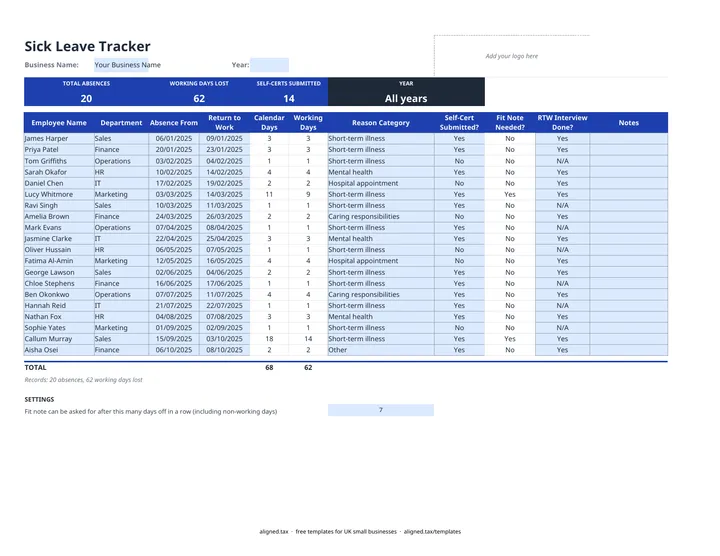
  1. Enter your Business Name at the top of the Sick Leave Tracker sheet. Type a Year to total only that year in the band, or leave it blank for all years.

  2. Add each absence as a new row: Employee Name, Department and Absence From. Leave Return to Work blank until the employee is back.

  3. Calendar Days and Working Days fill in once both dates are entered.

  4. Choose a Reason Category, then record Self-Cert Submitted? and RTW Interview Done? from the dropdowns.

  5. Check Fit Note Needed?. It shows Yes once an absence runs past 7 days in a row, counting non-working days. The 7 sits in the SETTINGS cell below the table.

  6. Review the band for TOTAL ABSENCES, WORKING DAYS LOST and SELF-CERTS SUBMITTED for the year.

This free sickness absence tracker gives UK employers one Excel sheet to log every period of sick leave. Enter the employee, first day off and return date, and it counts calendar and working days lost, flags when a fit note is due, and records self-certification and return-to-work interviews. Totals can cover one year or all years.

What does the tracker record?

Each row is one absence, so the same person can appear several times. The columns are:

  • Employee Name, Department, Absence From and Return to Work
  • Calendar Days and Working Days, calculated
  • Reason Category: short-term illness, hospital appointment, mental health, caring responsibilities or other
  • Self-Cert Submitted?, Fit Note Needed? and RTW Interview Done?
  • Notes

An ongoing absence with no return date stays blank in the day counts until the person is back. Dates are entered as dd/mm/yyyy.

How does the fit note check work?

Fit Note Needed? counts calendar days, not working days, because a fit note can be asked for once someone has been off for more than 7 days in a row, including weekends and other non-working days. A 10-day absence shows Yes and a 2-day absence shows No. If your policy uses a different trigger, change the 7 in the SETTINGS cell.

What changed for Statutory Sick Pay in 2026?

From 6 April 2026 SSP is paid from the first day of sickness, with no waiting days, and there is no lower earnings limit. The weekly rate is £123.25 or 80% of average weekly earnings, whichever is lower. The tracker does not calculate SSP, but the working days column helps you check payroll.

If you employ staff as a sole trader, your own Self Assessment records may soon move to Making Tax Digital for sole traders.
Sickness absence tracker for Excel (UK): FAQs

Is this template free?

Yes. The sickness absence tracker is free to download; you just enter your email address to get the Excel file.

When can an employer ask for a fit note?

An employer can ask for a fit note when an employee has been off sick for more than 7 days in a row, including non-working days. For shorter absences employees can self-certify. The tracker flags Fit Note Needed? on that basis.

Does the tracker calculate Statutory Sick Pay?

No, it records absence only. From 6 April 2026, SSP has no waiting days and no lower earnings limit, and it is £123.25 a week or 80% of average weekly earnings, whichever is lower. Work it out in your payroll software.

Does it calculate a Bradford Factor score?

No. It counts absences and working days lost per year, which are the two inputs a Bradford Factor needs, but it does not calculate the score.

Is it safe to keep sickness records in a spreadsheet?

Sickness records are health data, which is a special category of personal data. Store the file somewhere access-controlled and limit who can open it.

When it is time to file, use aligned.tax

Keeping your records in Excel? Read our guide to free MTD spreadsheet templates to see how aligned.tax sends your quarterly update to HMRC from an .xlsx file. Free for individuals, see pricing.

Using the Google Sheets copy? Download it as an Excel (.xlsx) file before uploading it to aligned.tax.