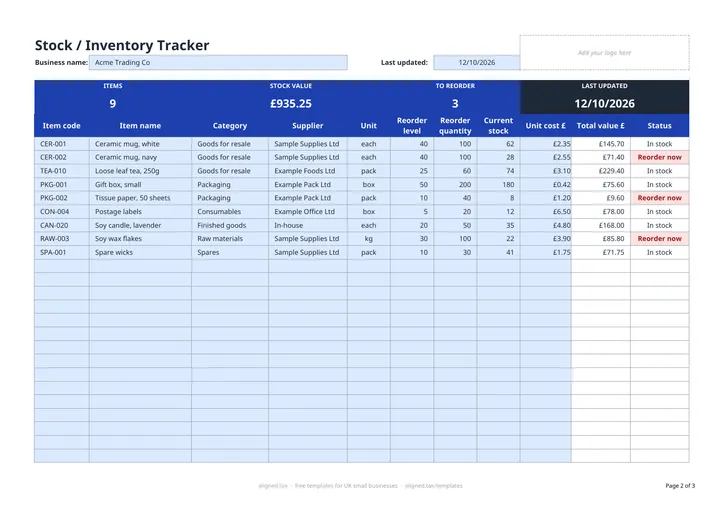
This free stock take and inventory template tracks what your business holds in Excel. For each item, record the stock on hand, unit cost and reorder level, and it calculates each line’s value and the total stock value, and flags anything to reorder. Change the Last updated date after each count so you know how current the figures are.
What does the template track?
| Column | Purpose |
|---|---|
| Item code, Item name, Category, Supplier | What the item is and where it comes from |
| Unit | each, kg, litre, m, box or pack |
| Reorder level and Reorder quantity | When to order and how much |
| Current stock and Unit cost £ | What you hold and what it cost |
| Total value £ | Current stock x unit cost |
| Status | Reorder now, in red, at or below the reorder level |
Categories cover raw materials, finished goods, goods for resale, packaging, consumables and spares.
How do I value stock at the year end?
The STOCK VALUE in the band is stock at cost. For your accounts and tax return, HMRC expects stock to be valued at the lower of cost and net realisable value: what you expect to sell it for, less the costs of selling it. Do a full count at your year end, write down anything damaged or unlikely to sell at cost, and use that adjusted figure as closing stock.
Stock and your business records
Closing stock affects your profit, so an accurate count matters for Self Assessment. If you are a sole trader with qualifying income over the threshold, your income and expense records also feed Making Tax Digital quarterly updates. See MTD for sole traders for what that involves.