This free UK timesheet template is a weekly timesheet in Excel for one employee. Enter the week ending date and hourly pay rate, then each day’s start time, end time and unpaid break. Hours worked calculate for every day, including night shifts that cross midnight, and the total hours and total pay for the week appear at the top.
What does the weekly timesheet record?
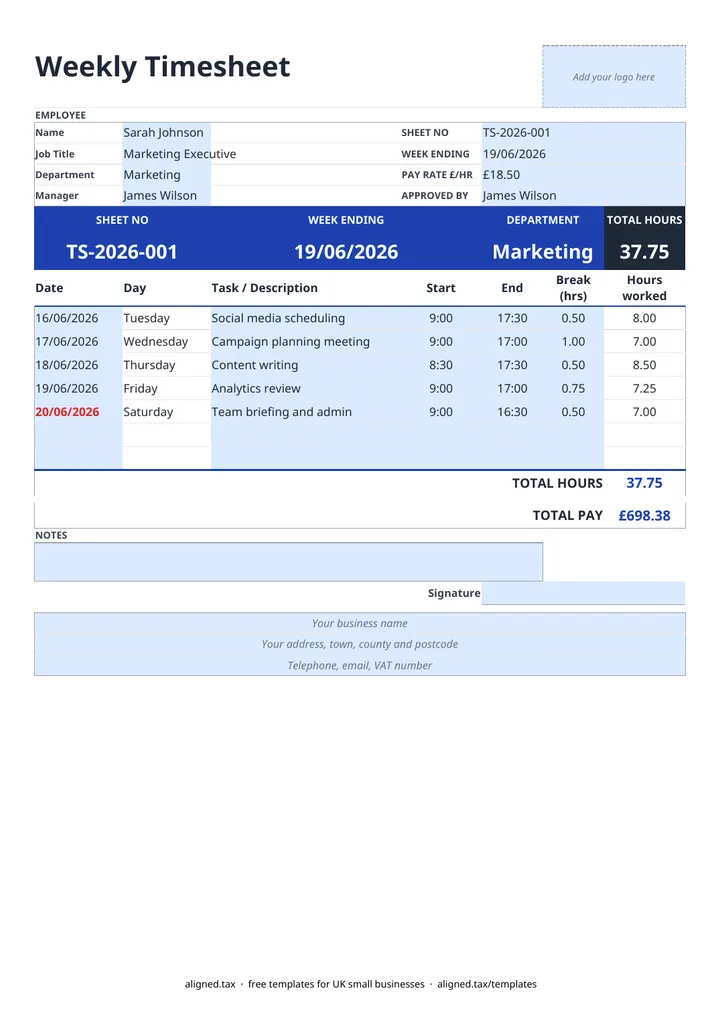
The sheet has seven day rows, one for each day of the week up to the week ending date, with these columns:
- Date and Day
- Task / Description, for the work done or the site worked at
- Start and End, on the 24-hour clock
- Break (hrs), unpaid break time in hours
- Hours worked, calculated as end minus start, less the break
The coloured band at the top shows the sheet number, week ending date, department and total hours, so a manager can check the week at a glance.
How are hours and pay calculated?
Each day’s hours are the gap between start and end, less the break. For example, 09:00 to 17:30 with a 0.5 hour break is 8.00 hours, and 22:00 to 06:00 with a 0.75 hour break is 7.25 hours. TOTAL PAY is total hours multiplied by the PAY RATE £/HR.
The sheet also checks your entries. A date that falls outside the week shown in WEEK ENDING turns red, and so does a break longer than the shift it belongs to, so mistakes are caught before payroll.
Why keep timesheets?
Timesheets are the record behind hourly pay, overtime and holiday calculations. They also help you show that pay meets the National Minimum Wage, as employers must keep records that prove it. If you run payroll for staff as a sole trader, wages are a business cost too, and Making Tax Digital for sole traders explains how your costs will be reported to HMRC.