Next Making Tax Digital quarterly update deadline: 7 November 2026.Start filing now

How to fill it in

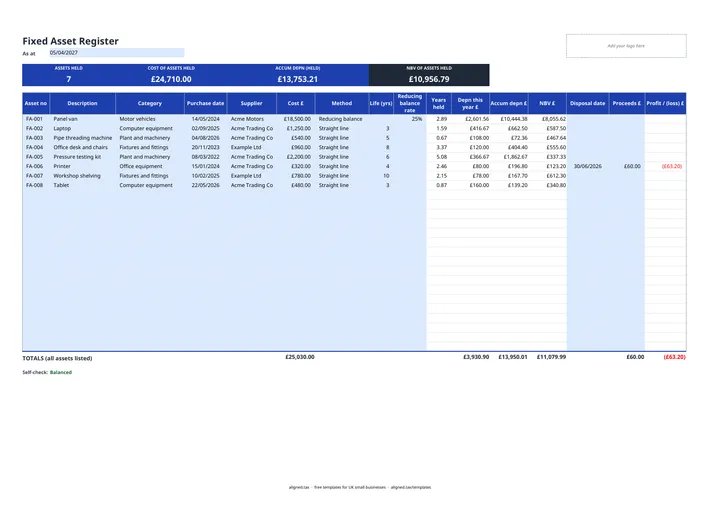
  1. On the Fixed Asset Register tab, enter the As at date, usually your accounting year end. Every depreciation figure is worked out to this date.

  2. Add one row per asset: Asset no, Description, Category (from the dropdown), Purchase date, Supplier and Cost £.

  3. Choose a Method. For Straight line, enter the Life (yrs). For Reducing balance, enter the Reducing balance rate, such as 25%.

  4. Years held, Depn this year £, Accum depn £ and NBV £ calculate on their own.

  5. When you sell or scrap an asset, enter the Disposal date and any Proceeds £. The Profit / (loss) £ appears and depreciation stops at that date.

  6. Check the Self-check line. It flags a row missing its cost, purchase date, method, life or rate.

This free fixed asset register template keeps a list of everything your business owns for the long term, from laptops to vans, with cost, purchase date and supplier. Choose straight-line or reducing-balance depreciation for each asset, set an “As at” date, and it calculates this year’s depreciation, accumulated depreciation, net book value and any profit or loss when you sell.

What the register records

Each row is one asset, with these columns:

Inputs Calculated
Asset no, Description, Category, Purchase date, Supplier, Cost £ Years held
Method, Life (yrs) or Reducing balance rate Depn this year £, Accum depn £
Disposal date, Proceeds £ NBV £, Profit / (loss) £

Categories in the dropdown are plant and machinery, fixtures and fittings, motor vehicles, computer equipment, office equipment, and land and buildings. Depreciation is worked out on time held, so an asset bought partway through the year is charged pro rata. The band at the top counts assets still held and shows their cost, accumulated depreciation and net book value.

Depreciation and capital allowances are different things

Depreciation spreads an asset’s cost across its useful life in your accounts. HMRC does not accept it as a tax deduction. Instead you claim capital allowances:

  • The Annual Investment Allowance gives 100% relief on most plant and machinery, up to £1 million a year.
  • Cars do not qualify for the AIA; they get writing down allowances.
  • Sole traders and partnerships using the cash basis claim most equipment as an allowable expense instead, and capital allowances only on cars.

Keeping the register up to date gives you the purchase dates and costs you need for either calculation. If you use the self-employed profit and loss template, depreciation is added back there and capital allowances deducted.

Keeping the register each year

At each year end, change the As at date, add the year’s purchases and record any disposals. The totals row includes every asset listed, sold or not, while the band shows only assets still held.
Fixed Asset Register Template UK: FAQs

Is this fixed asset register template free?

Yes. It is free to download; you just enter your email address to get the Excel file.

What is a fixed asset register?

A fixed asset register is a list of the equipment, vehicles, fixtures and other long-term items a business owns, with what each cost, when it was bought, how much it has been depreciated and what it is worth in the accounts now.

Can I deduct depreciation for tax?

No. Depreciation is not allowed as a deduction for tax; businesses claim capital allowances instead. The register works out depreciation for your accounts, not your tax bill.

What is the Annual Investment Allowance?

The Annual Investment Allowance (AIA) gives 100% relief in the year of purchase on most plant and machinery, up to £1 million a year. Cars do not qualify and get writing down allowances instead.

What is the difference between straight line and reducing balance?

Straight line charges the same amount each year over the asset's useful life. Reducing balance applies the same percentage to the falling value each year, so the charge is highest in the early years.

When it is time to file, use aligned.tax

Keeping your records in Excel? Read our guide to Making Tax Digital for sole traders to see how aligned.tax sends your quarterly update to HMRC from an .xlsx file. Free for individuals, see pricing.

Using the Google Sheets copy? Download it as an Excel (.xlsx) file before uploading it to aligned.tax.