Next Making Tax Digital quarterly update deadline: 7 November 2026.Start filing now

How to fill it in

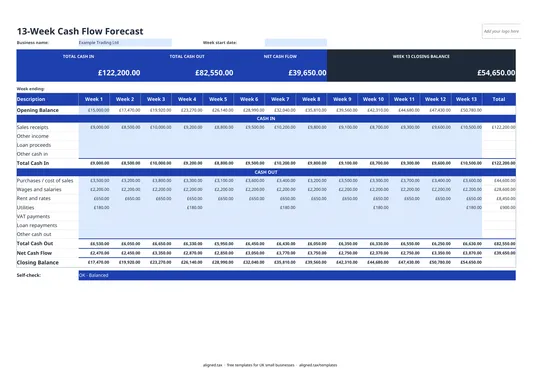
  1. On the General Journal tab, type your business name in the blue cell under the title and enter the Period, for example 2026/27 or Year ended 31 March 2027.

  2. For each line, enter the Date (dd/mm/yyyy) and a Journal No such as JNL-001. Lines that share a journal number make up one entry.

  3. Enter the Account Code and Account Name from your chart of accounts, and a short Description of why the journal is needed.

  4. Put the amount in either Debit £ or Credit £, not both. Each journal's debits must equal its credits.

  5. Check the Check column. It shows OK on every line of a balanced journal and flags an unbalanced journal, a missing journal number or a line with both a debit and a credit.

  6. The STATUS tile shows Balanced when every journal is correct and total debits equal total credits.

This free general journal template records double-entry journal entries for a UK small business: corrections, reclassifications and year-end adjustments that do not come from an invoice or bank line. Each line carries a journal number, and the sheet checks that every journal’s debits equal its credits, not just the grand total.

What kind of entries go in the journal?

Typical journal entries include:

  • Corrections: moving a cost posted to the wrong account.
  • Depreciation: the year’s charge on equipment and vehicles.
  • Accruals and prepayments: matching costs to the period they belong to.
  • Opening balances: setting up accounts at the start of a new system.
  • Year-end adjustments: stock counts, bad debts and similar items your accountant asks for.

How the per-journal check works

Many journal templates only compare total debits with total credits. That misses two unbalanced journals that happen to cancel each other out. This template adds up debits and credits for each journal number separately, and the Check column shows OK only when that journal balances. It also flags a missing journal number or a line with an amount in both columns. The STATUS tile reads Balanced only when every line passes.

Good habits for journals

  • Number journals in order (JNL-001, JNL-002) and enter all lines of one journal before starting the next.
  • Write a clear reason in the Description. Journals change ledger balances, so whoever reviews them later needs to know why.
  • Once posted, carry the new balances into your trial balance template.
General Journal Template for Journal Entries (UK): FAQs

Is this general journal template free?

Yes. It is free to download; you just enter your email address to get the Excel file.

What is a general journal used for?

A general journal records entries that do not come through your day-to-day sales, purchases or bank records, such as corrections, depreciation, accruals, prepayments and year-end adjustments.

How do I know a journal entry is correct?

Every journal must have equal debits and credits. The template totals each journal number separately and shows OK in the Check column only when it balances.

Why number each journal?

A journal number groups the lines of one entry together, so the template can check each entry on its own and anyone reviewing your books can trace every adjustment.

When it is time to file, use aligned.tax

Keeping your records in Excel? Read our guide to Making Tax Digital for sole traders to see how aligned.tax sends your quarterly update to HMRC from an .xlsx file. Free for individuals, see pricing.

Using the Google Sheets copy? Download it as an Excel (.xlsx) file before uploading it to aligned.tax.