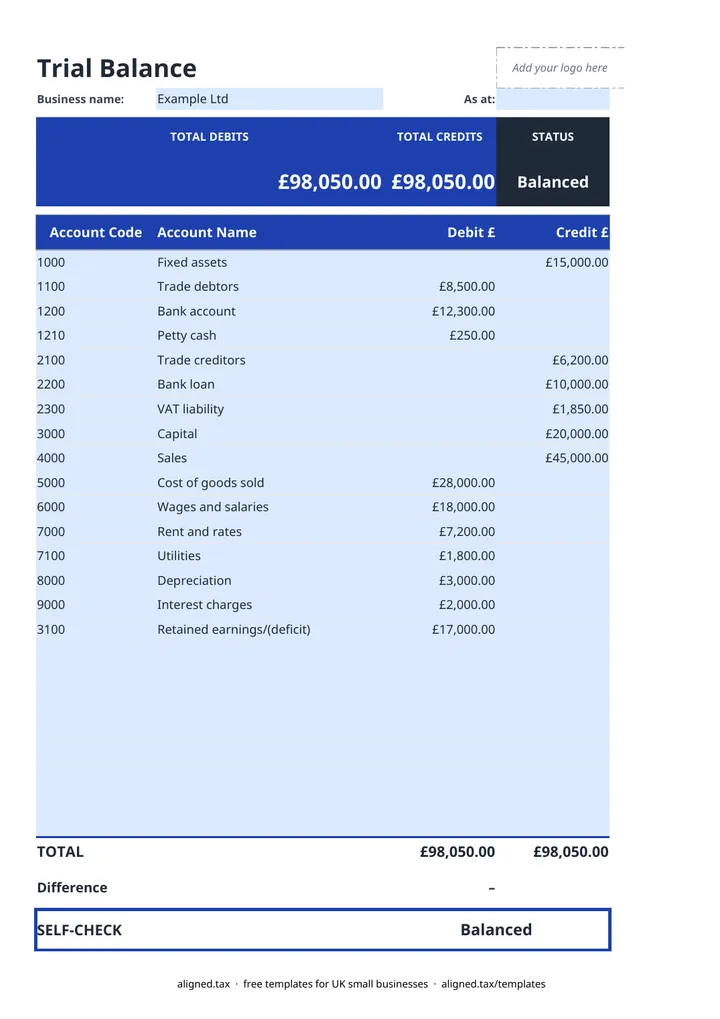
This free trial balance template lists every account in your ledger with its closing debit or credit balance at a chosen date, then checks that the two columns agree. It is the step between bookkeeping and the year-end accounts: once it balances, the figures can be used to build a profit and loss account and a balance sheet.
How to read the result
The tiles at the top show total debits, total credits and a status. “Balanced” means the totals agree. Otherwise the status shows the difference, which is your starting point for finding the error. The self-check also flags any row with an amount in both columns, a common slip when typing balances.
Normal balances at a glance
| Account type | Usual side |
|---|---|
| Assets (bank, debtors, equipment) | Debit |
| Expenses (rent, wages, materials) | Debit |
| Liabilities (creditors, loans, VAT owed) | Credit |
| Capital and retained earnings | Credit |
| Income (sales, other income) | Credit |
Common reasons a trial balance does not balance
- A balance typed on the wrong side.
- A transposed figure, such as 450 entered as 540. A difference divisible by 9 often points to this.
- An account missed out entirely.
- A journal posted with only one side.
If you need to correct balances with adjustments, record them in the general journal template first, then update the trial balance. Once it balances, carry the figures into the balance sheet template.