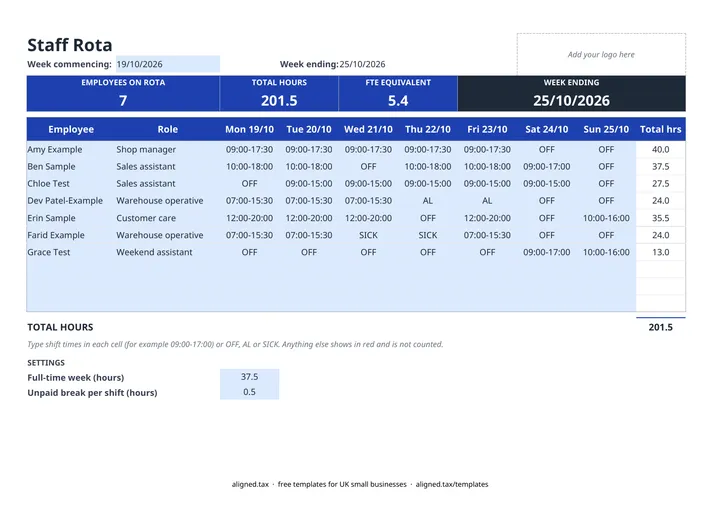
A staff rota shows who is working which shift each day of the week. This free Excel rota template takes shift times typed as 09:00-17:00 for up to 10 people, works out each person’s weekly hours (including overnight shifts and unpaid breaks), and shows total hours and full-time equivalent for the week at the top.
What can you type in a shift cell?
Each day cell accepts a shift time range or a short code:
| Entry | Meaning | Hours counted |
|---|---|---|
| 09:00-17:00 | Day shift | 8, less the unpaid break setting |
| 22:00-06:00 | Night shift crossing midnight | 8, less the unpaid break setting |
| OFF | Rest day | 0 |
| AL | Annual leave | 0 |
| SICK | Off sick | 0 |
Anything else, such as “9-5”, turns red and is not counted, so a typing slip never inflates the hours.
Planning cover with total hours and FTE
The band across the top shows how many people are on the rota, the total hours scheduled and the FTE equivalent, based on the full-time week in SETTINGS. If your full-time week is 40 hours rather than 37.5, change the setting and the FTE updates.
Comparing total hours week to week helps you spot when you are short of cover, or paying for more hours than the trade needs.
Rota rules worth knowing
Under the Working Time Regulations, adult workers are entitled to a 20-minute rest break when they work more than 6 hours in a day and 11 hours’ rest between working days. Watch for a late finish followed by an early start, which is the easiest way to break the 11-hour rule by accident. Agree rotas with staff in advance and keep the copy you published.
For tracking the hours actually worked against the rota, and the pay due, use the weekly timesheet template.